About the Profit & Loss report
Revenue minus cost of goods sold minus operating expenses for a period, straight from your ledger, with context lines for inventory purchases and write-offs.
Profit & Loss answers "what did I make in this period?": your revenue, less the cost of the goods you sold, less your operating expenses. It reads your ledger, so returns are taken off and every sale counts on the day it shipped.
Where to find it
Open Reports and click Profit & Loss, the first card under General. Like every report with money in it, it needs money access.
Running it: period and channel
- Pick a period from the presets at the top. The report opens on This year. All time covers everything you have recorded. There is no date picker.
- The channel filter narrows it to Manual, the orders you entered, or to one connected shop. It narrows revenue and cost of goods sold only. Operating expenses and purchases belong to the whole business, so they stay. Connecting a sales channel (Shopify, Etsy or Faire) isn't covered in this help center yet. Email support@trackost.com and we'll walk you through it.
- Export CSV and Save as PDF sit after the presets (on a narrower window, on a line of their own below them).
What it shows
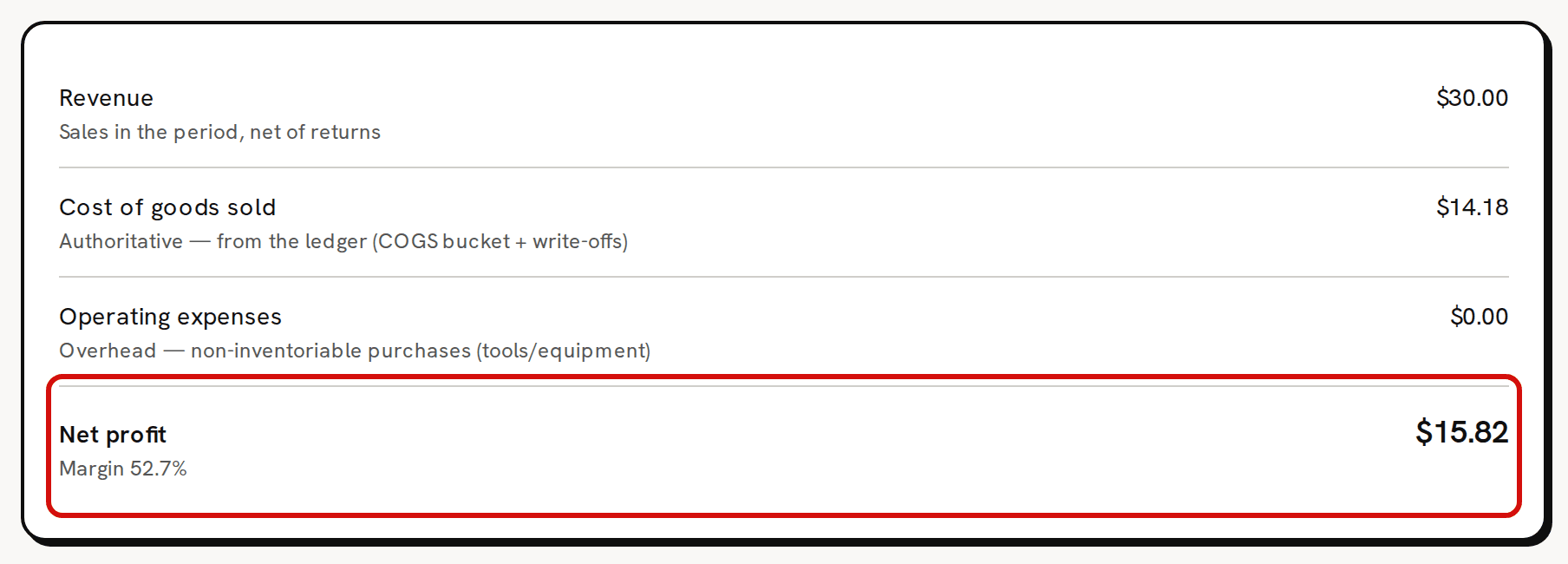
The top card is the report itself, four lines that end in your net profit.
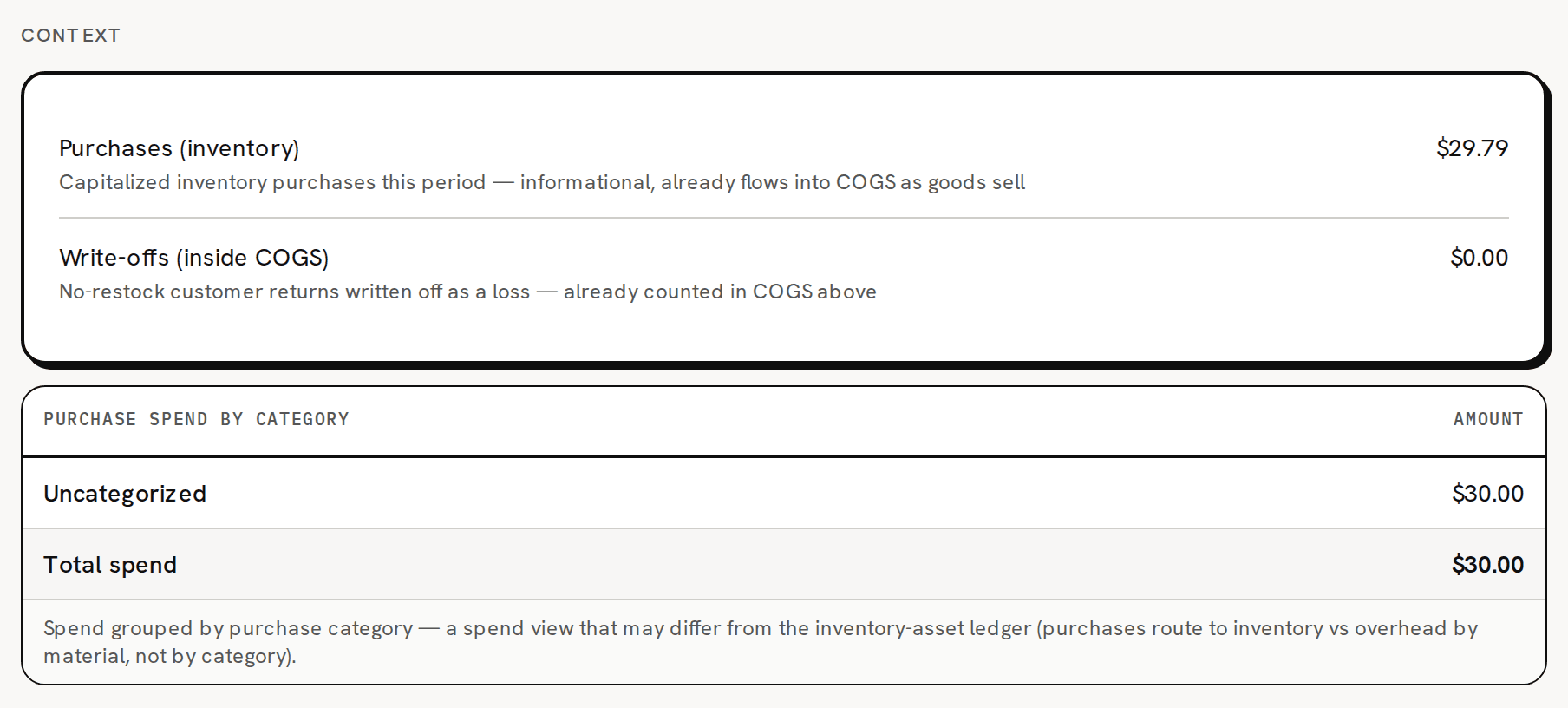
Under Context, two more lines explain where your money went without changing the net profit. When you bought anything in the period, a table of your purchase spend by category follows.
| Line | What it is |
|---|---|
| Revenue | The price of what you sold, for sales that shipped in the period, less the refunds on returns recorded in the period. |
| Cost of goods sold | The COGS of the sales that shipped in the period, less the cost taken back by returns you restocked, plus the cost written off by returns you didn't restock. |
| Operating expenses | What you paid in the period for tools and equipment: materials not tracked as inventory. |
| Net profit | Revenue − cost of goods sold − operating expenses. The margin under it is net profit divided by revenue. |
| Purchases (inventory) | The value your purchases added to your stock in the period, less vendor credits, plus or minus stock adjustments. It is there for context only and is never taken off again. |
| Write-offs (inside COGS) | The cost of returns you didn't restock. It is already inside cost of goods sold. |
| Purchase spend by category | The period's purchases of materials, tools included, grouped by the purchase category they were given. |
When the period has no revenue, the margin reads 'Margin —'. A period with no fulfilled sales and no purchases shows $0.00 on every line. The untouched sample workspace has two open orders and no purchases, so that is what it shows.
How it is calculated
Every line of the report and its Context lines come from your ledger, the record Trackost keeps of every movement of stock and money:
- A sale counts on its ship date, the date you picked when you fulfilled the order, not on its order date.
- A return counts on the day you record it. It takes its refund off revenue and its cost off cost of goods sold.
- A purchase counts on its purchase date.
Cost of goods sold includes labor, because your batches build labor into the cost of what you make. It doesn't include a recipe's flat overhead, which no batch adds.
Channel and payment fees are not on this report, so its net profit is before fees. Orders Margin and the Profit dashboard show them.
Purchases (inventory) is not only purchases. A vendor credit lowers it, and so does every adjustment that takes stock out, such as spoilage or a stocktake that found less. An adjustment that adds stock raises it. In the picture above, the sample workspace bought $30.00 of fragrance oil and took 3 wicks out with a stocktake, so Purchases (inventory) reads $29.79 while the spend table reads $30.00. Stock you throw away lowers your stock's value, and never your cost of goods sold or net profit.
A return you don't restock is counted twice here. The sale's cost stays in cost of goods sold, and the cost written off is added on top, although the Write-offs (inside COGS) hint says it is counted once. For a period with such a return, take Write-offs (inside COGS) off Cost of goods sold to get the cost that left your business. The Profit dashboard counts it once, so the two reports disagree by exactly that amount.
Purchase spend by category
The table groups the period's material purchases, tools included, by their purchase category's type: Materials, Other, or Uncategorized for a purchase with none. A new workspace has no purchase categories and nothing in Trackost creates one, so its purchases all read Uncategorized.
This table can differ from Purchases (inventory), and the note under it says so. The table follows the category you gave each purchase; the ledger follows whether each material is tracked as inventory. Tool purchases, for example, sit in operating expenses on the ledger.
How it reconciles with Schedule C
For a calendar year, Cost of goods sold here is the same figure as the Cost of goods sold line on Schedule C (COGS) for that year, because both are built from the same ledger entries. Pick This year or Last year here and the matching year on Schedule C (COGS). Both count a return without restock twice, so correct both the same way.
Export
Export CSV downloads profit-and-loss.csv for the period and channel on screen, one line per row: Revenue, COGS, Operating expenses, Net profit, Purchases (inventory), the write-off and one row per spend category, with amounts such as 1234.50. Save as PDF opens your browser's print window to print or save the report.
Common questions
Why is everything $0.00?
Nothing shipped in the period and nothing was bought. An open order isn't a sale yet. Once you fulfill it, it counts on its ship date. Check the period too, because the report opens on This year.
Why doesn't it match the Profit dashboard?
The Profit dashboard covers all time, takes fees off, leaves operating expenses out and counts a return without restock once. Set this report to All time and compare the cost lines, not the bottom lines.
Why doesn't it match Orders Margin?
Orders Margin files an order by its order date and shows it as it was fulfilled, before any return. This report counts a sale on its ship date and takes returns off.
Can I file my taxes from it?
It is a starting point for you and your accountant, not tax advice. Check its figures before they go on a return.