About pricing and suggested prices
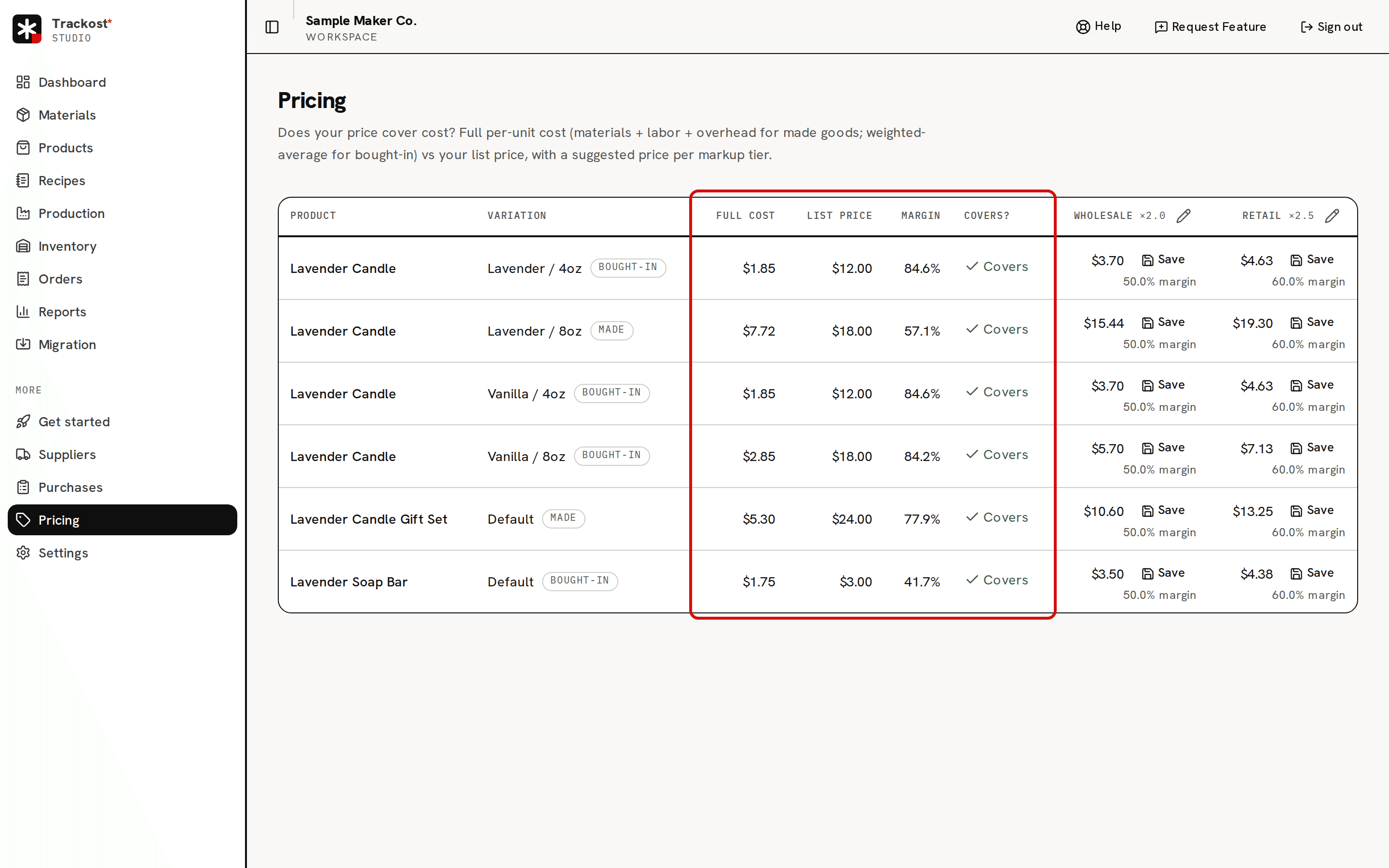
What the Pricing page does: each variation's full cost against its list price, a Covers or Below cost verdict, and a suggested price for each markup tier.
The short answer
- Pricing compares what one unit of each product variation costs you with the price you sell it at, and suggests a price for each markup tier.
- Full cost is what one unit costs to make now: for a variation with a recipe, its materials at today's costs plus labor plus the recipe's flat overhead. For any other variation, it is the weighted-average cost of its stock.
- A suggested price is full cost times the tier's multiplier. Saving one never changes your list price.
- Pricing shows money, so only members with money access can open it.
Where is Pricing?
In the sidebar, under More, click Pricing. The page needs money access. A team member without it doesn't see Pricing in the sidebar, and opening the page shows 'Money access required'. If your trial or plan has ended, every page opens behind the plan wall, and a page left open in another tab refuses Set up default tiers, Save and a tier change with 'Your plan has ended — subscribe to continue making changes.'
Each product's own page has a Pricing card with the same columns for that product's variations.
What is full cost?
Each row is one variation, and its badge says where its Full cost comes from:
- Made: the variation has a recipe. Full cost is the recipe worked out at today's costs: every material at its current weighted-average cost, waste included, plus labor, the recipe's minutes at your labor rate, plus the recipe's flat overhead, divided by what the recipe makes. It moves as soon as a material's cost moves.
- Bought-in: no recipe. Full cost is the variation's weighted-average cost, the average cost of the stock you hold.
In the sample workspace, Lavender / 8oz is Made at $7.72: $5.02 of materials, $2.50 of labor and $0.20 of overhead. That is not the $2.85 Unit cost the product's page shows for it. About full cost vs unit cost explains why both are right.
List price, margin and Covers?
List price is the price you set on the variation. Margin is the share of that price left after full cost: (list price − full cost) ÷ list price. Lavender / 8oz sells for $18.00, so its margin is ($18.00 − $7.72) ÷ $18.00 = 57.1%.
Covers? gives the verdict:
- Covers: the list price is at or above full cost. A price exactly equal to full cost counts as Covers.
- Below cost: the list price is under full cost. Every sale at that price loses money before fees.
- Unpriced: the variation has no list price yet.
A variation with no cost yet has a full cost of $0.00, so any price reads Covers with a 100.0% margin. The verdict means nothing until the cost is real.
Markup tiers and the suggested price
The columns at the right are your markup tiers, each with a suggested price per variation. The default tiers are Wholesale ×2.0 and Retail ×2.5:
suggested price = full cost × (1 + markup % ÷ 100)
Wholesale has a markup of 100%, so its multiplier is ×2.0; Retail has 150%, so ×2.5. For Lavender / 8oz that is $15.44 wholesale and $19.30 retail. The line under each suggestion is the margin you would make at that price. On a laptop-sized window the last tier column can sit past the right edge of the page, so scroll sideways to see it.
A new workspace has no tiers. Pricing says 'No pricing tiers yet'; click Set up default tiers to create Wholesale and Retail. You see 'Default tiers created'.
You change a tier with the pencil beside its name in the column heading on Pricing: its markup, a channel tag and the fees it allows for. The product page's Pricing card has no pencil. Tiers can't be added, renamed or removed.
Suggestions that allow for fees
A tier can carry a channel's fees: a percentage, a flat fee per order, or both. Its suggestion then grosses up so that you keep the same profit in dollars after the fees:
suggested price = (full cost × multiplier + flat fee) ÷ (1 − fee % ÷ 100)
The profit stays the same and the margin goes down. On the $7.72 candle, Retail without fees suggests $19.30 and leaves you $11.58, a 60.0% margin. With a 6.5% fee and a $0.20 flat fee, it suggests $20.86. After the fees you still keep $11.58, but that is a 55.5% margin, and the line under the suggestion says so.
Saving a suggestion
Save beside a suggestion records that price for the variation and tier. You see 'Suggested price saved' and, for example, 'Retail: $19.30 (list price unchanged).' Your list price stays as it was. A saved suggestion isn't shown anywhere else in Trackost yet. To sell at a suggested price, open the product and change the variation's Price.
Why is a suggestion $0.00?
Because the full cost is $0.00, and any markup of $0.00 is $0.00. A Bought-in variation has a $0.00 full cost until its stock has a cost. A Made variation reaches $0.00 when its materials have no cost and it has no labor and no overhead. It has no labor when the recipe has no minutes, or when the workspace has no labor rate set: a new workspace starts at $0.00 an hour. With labor or overhead, its full cost is those alone, too low but not zero. The sample candle with no material costs would show $2.70, its $2.50 of labor and $0.20 of overhead. Record what the materials cost, set your labor rate, or give the stock a cost when you adjust it, and the suggestions follow.
Suggestions are a starting point
The market, your time and what your buyers pay decide the price. The free pricing calculator on trackost.com/calculator works without an account, from numbers you type in. Pricing works from your workspace's real costs.