TUTORIAL: Introduction to production runs
About 15 minutes: plan three candles, read the preview and projected cost, make them now, then schedule, start and complete a second batch.
Why this matters
A production run, or batch, is how finished stock gets into Trackost. When you record one, Trackost takes the recipe's materials out of stock, works out what each finished unit cost you, and adds the units to the product at that cost. Your sales are later costed from it. Skip a batch, and your materials stay in stock on paper while the product sells from stock Trackost never saw you make.
You can record a batch two ways. Make it now records one you have already made, in one click. Schedule for later puts it on your calendar first; you start it at the bench and complete it when it's done. This tutorial walks both with the sample workspace's Lavender Candle. One candle takes Soy Wax (GW464), Lavender Fragrance Oil, a Cotton Wick (CD-8), an 8oz Glass Jar, a Front Label and 10 minutes of labor at $15.00 an hour. Follow along with one of your own products; your numbers will differ.
You need a product with a recipe first. Only variations with an active recipe can be produced.
Plan a run
Open Production in the sidebar and click Plan a run.
Under What to produce, open Product and pick Lavender Candle — Lavender / 8oz. The planner opens with the first product in the list already picked. In the sample workspace that is the gift set, so pick the candle yourself.
Type 3 in Quantity to produce. It counts finished units, here three candles.
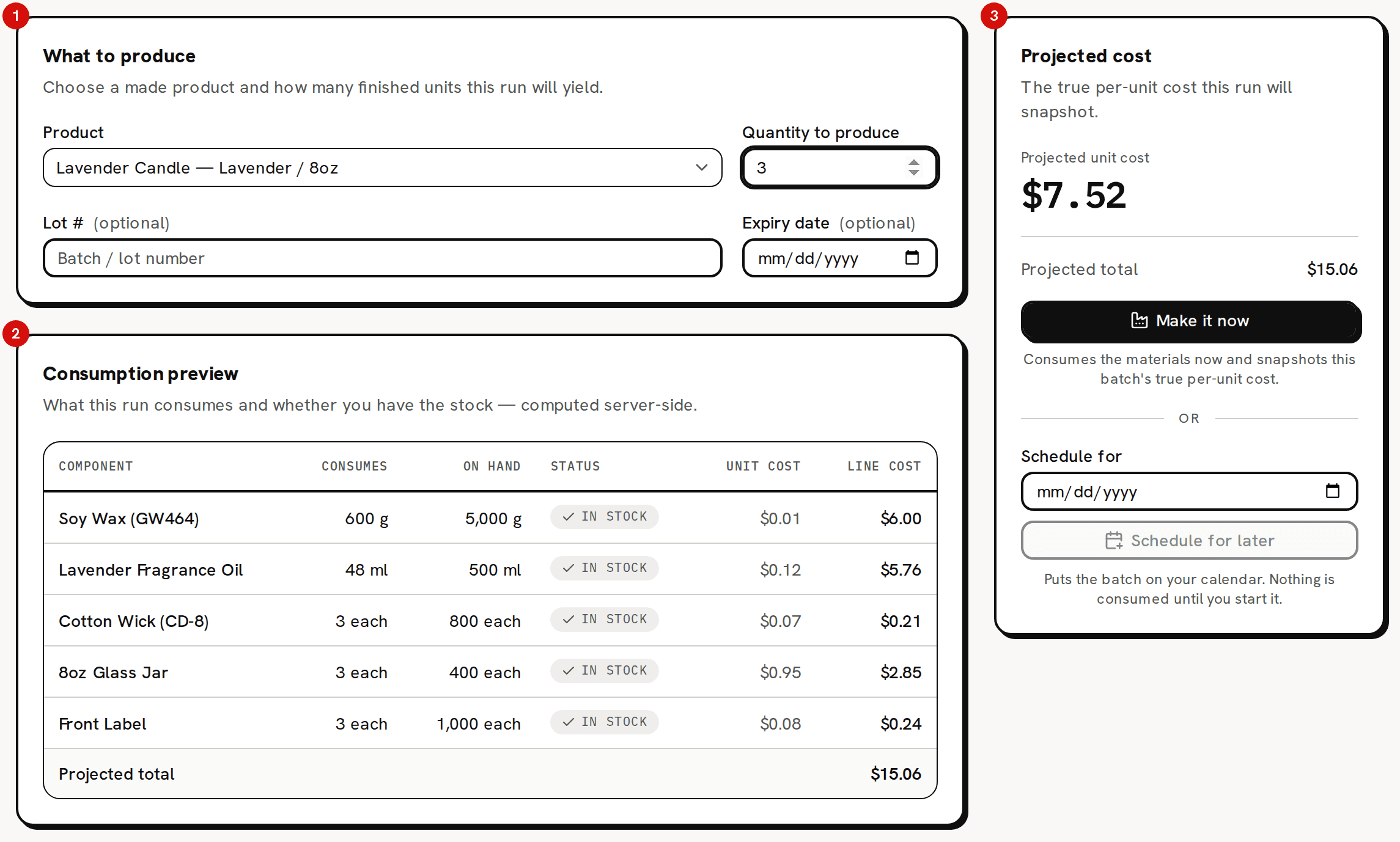
The planner: what to make, what it uses, what it will cost.
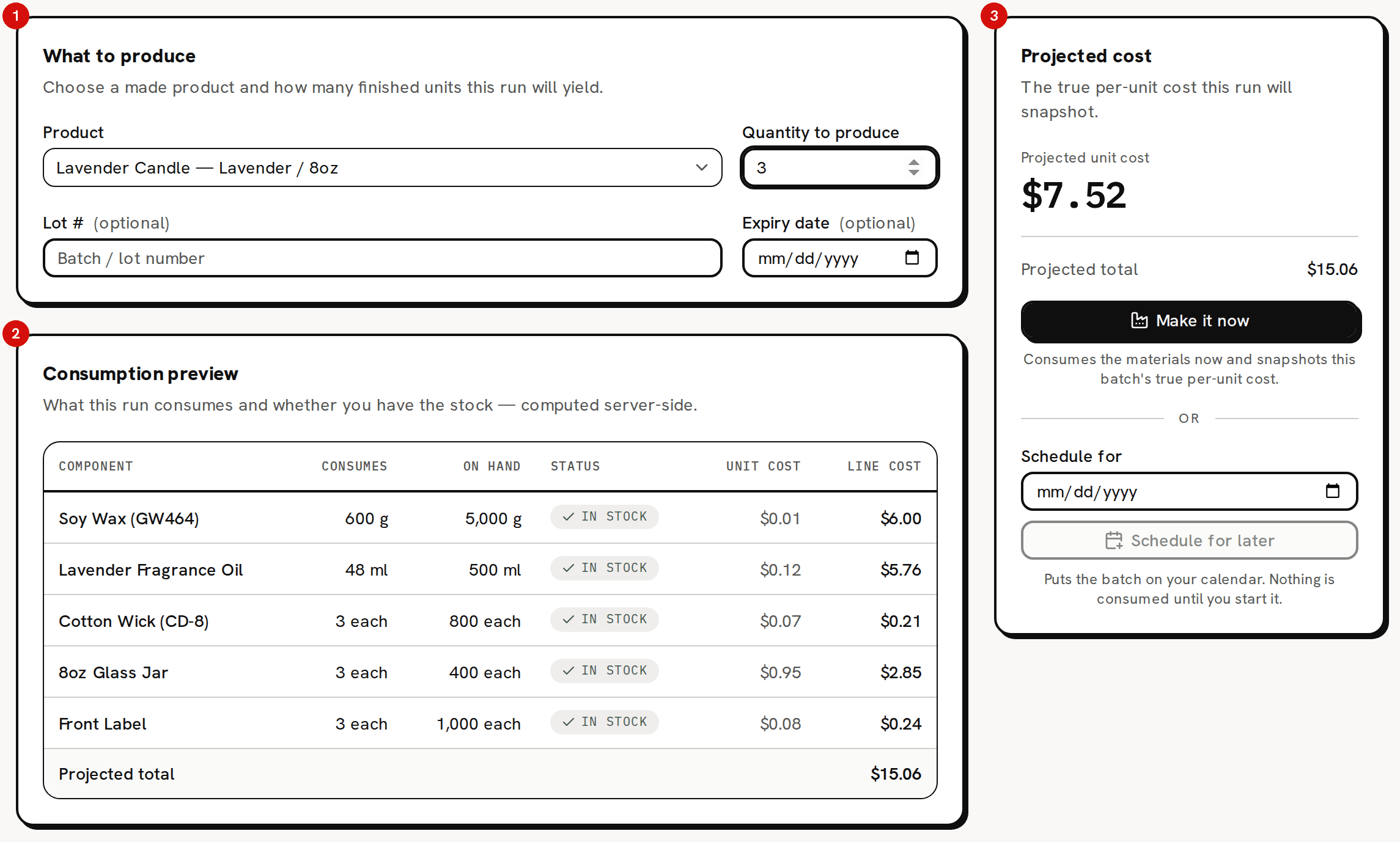
Read what the batch uses and costs
Read the Consumption preview. Each row is one component: what this batch Consumes, what you have On hand, and a Status of In stock or Short. It also shows each component's Unit cost and Line cost.
Read the Projected cost card on the right. Projected unit cost is $7.52: $5.02 of materials and $2.50 of labor in each candle. Projected total is $15.06, the materials for all three.
Projected unit cost includes labor. Projected total is only the materials the batch uses, so it isn't the unit cost times the quantity, which would be $22.56. A recorded batch's Unit cost and Total cost work the same way.
A Short component doesn't stop you. If you make the batch anyway, that material's stock goes below zero and Trackost warns you. Record the missing purchase afterwards so your costs stay right.
Make it now
Optionally type a Lot #, such as LOT-2026-09, and pick an Expiry date. They stay on the batch for your records and don't change its cost.
Click Make it now. There is no confirmation. 'Production run completed' appears and you land on Production, where the batch reads Completed with a Unit cost of $7.52 and a Total cost of $15.06.

Completed: $7.52 a candle, $15.06 of materials for three.

That one click took 600 g of wax, 48 ml of fragrance oil, 3 wicks, 3 jars and 3 labels out of stock, added 3 candles to Lavender / 8oz, and dated the batch today.
Schedule a batch for later
Click Plan a run again, pick the candle and type 2 in Quantity to produce.
In the right card, pick a day in Schedule for. The field starts empty, and Schedule for later stays unavailable until you pick a date.
Click Schedule for later. 'Batch scheduled' appears and the production calendar opens on that month, with the batch on its day marked Scheduled.
Nothing has been used yet. A scheduled batch holds no stock and no cost, so its Unit cost and Total cost read '—' on the list.
Start the batch
Click Start on the batch in the calendar. You don't have to wait for its day, and there is no confirmation. 'Batch started' tells you '$10.04 of components moved into work in progress.' and the batch now reads In progress.
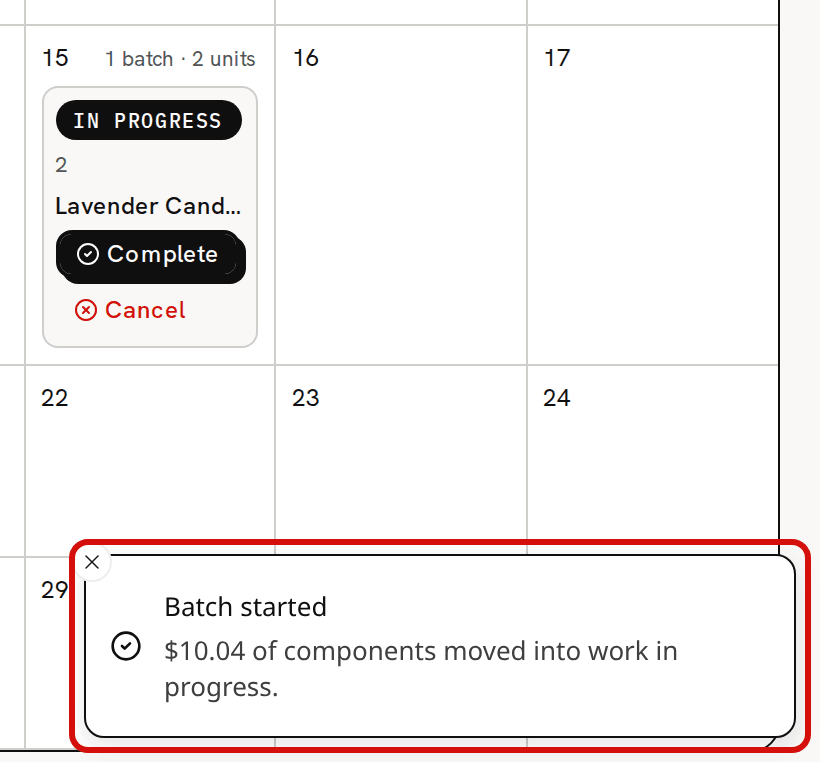
Starting moves the components’ value into work in progress. Open Inventory. Total inventory valuation is $10.04 lower than before you started the batch, and In progress (1 batch) beside it holds the $10.04.
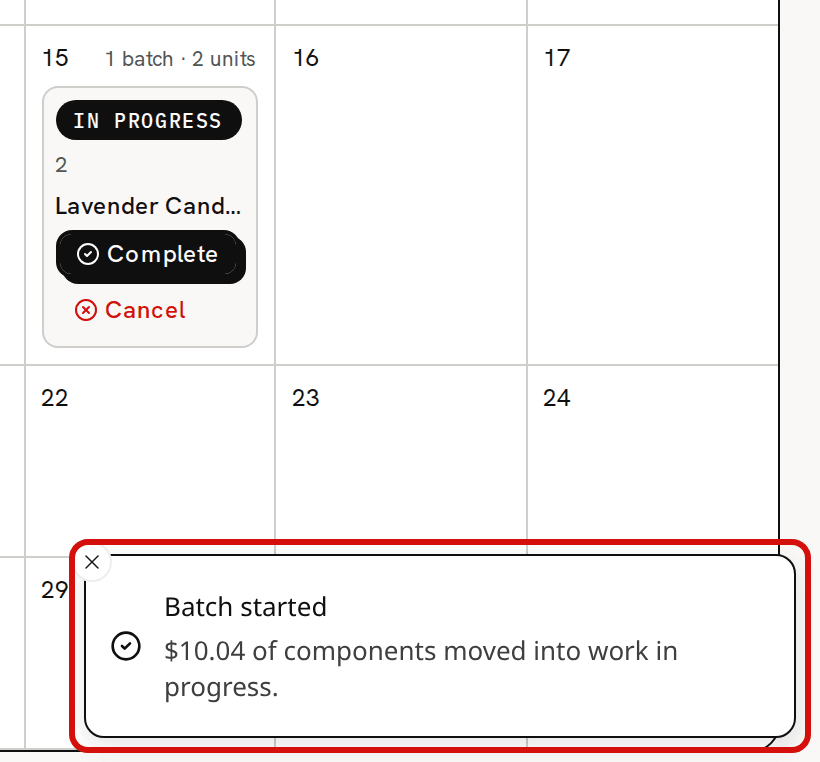
Starting is when the materials leave stock, at what they cost today. Trackost also freezes what the batch used and at what cost, so a purchase or a recipe change after this doesn't change the batch.
Complete the batch
Open Production and click Lavender Candle, the product name on the In progress row. The batch's own page opens.
Click Complete at the top of the page. 'Batch completed' tells you 'Finished stock added at $7.52 per unit.' The status becomes Completed, with a Unit cost of $7.52 and a Total cost of $10.04.
The two candles are added at $7.52 each, labor included, and blend into Lavender / 8oz's weighted-average cost. In the sample workspace it now holds 125 candles at $3.04. In progress on Inventory is back to $0.00.
Read the batch page
Read the cards: Status, Quantity, the dates, Unit cost, Total cost, Lot #, Expiry and Recorded by. Below them, Components consumed lists what the batch used, frozen when it started. Its Components total of $10.04 equals the batch's Total cost.
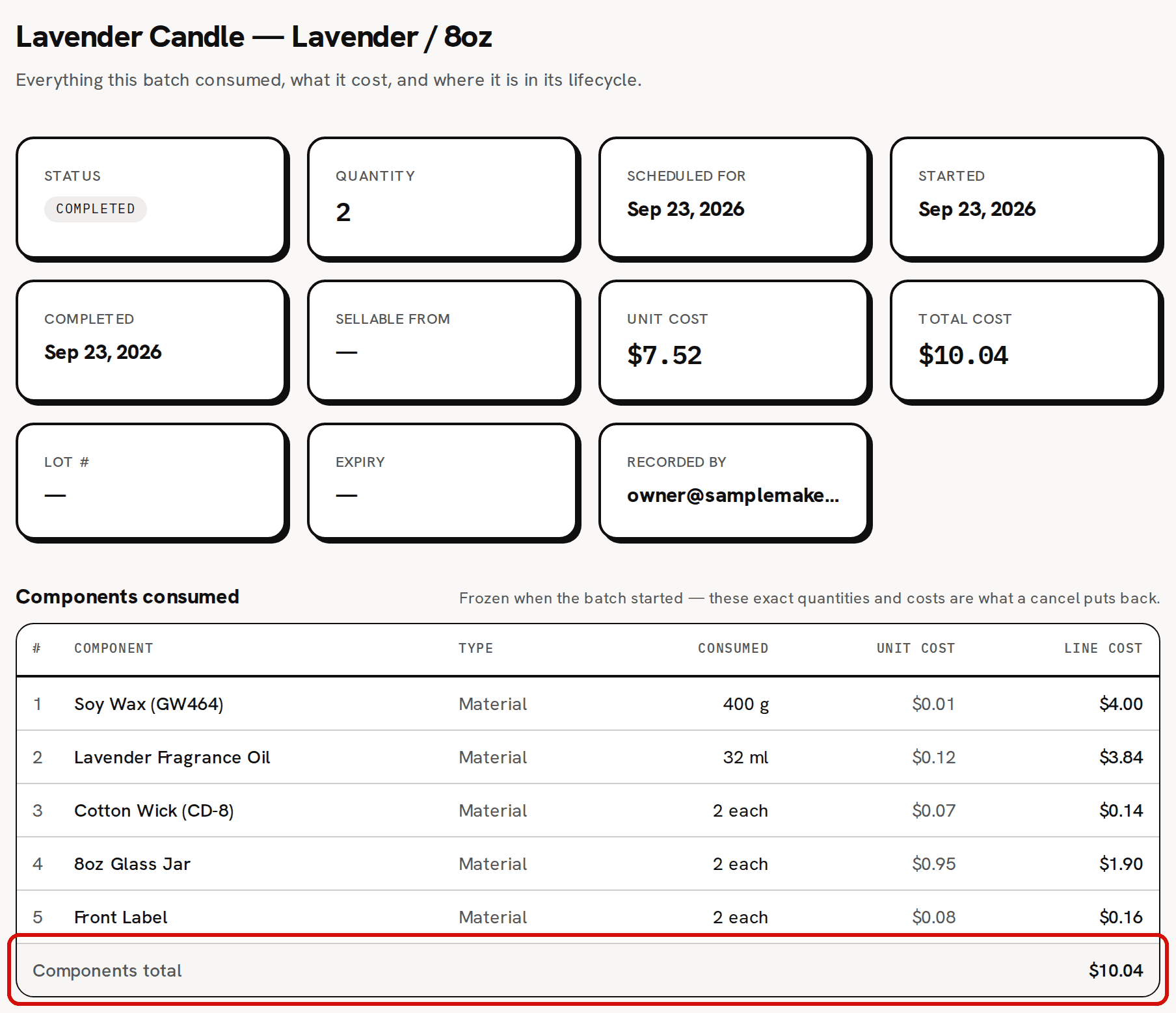
Frozen when the batch started: exactly what it used, and at what cost.
The batch you made with Make it now has no Components consumed table. It was used, costed and closed in one step, and its page says so.
What you have now
- Two batches on Production, both Completed at $7.52 a candle: 3 made now, and 2 scheduled, started and completed.
- Five more candles in Lavender / 8oz, blended into its weighted-average cost.
- The materials both batches used, out of stock at what they cost when they were used.
About production runs explains the four statuses and what each one allows. About a batch's unit cost and total cost explains the two numbers.