About a batch's unit cost and total cost
How Trackost works out the unit cost it records on a batch, materials at weighted-average cost plus labor, and why Total cost isn't unit cost × quantity.
The short answer
- A batch's Unit cost is the components it used, at their weighted-average cost when it started, plus your labor, divided by the units made.
- Its Total cost is the components only, without this batch's labor, so it isn't Unit cost × Quantity.
- The recipe's flat overhead is never part of a batch's cost.
- Once recorded, a batch's costs never change. A later purchase, recipe edit or labor-rate change applies to the next batch.
What is the formula?
Unit cost = (each component's quantity × its weighted-average cost, added up, + labor) ÷ units made
Total cost = each component's quantity × its weighted-average cost, added up
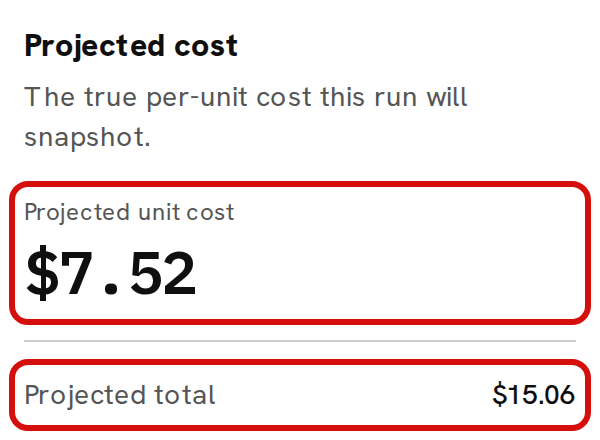
Both are worked out when the batch starts: the moment you click Make it now, or Start on a scheduled batch. The planner shows them before you commit, as Projected unit cost and Projected total.
How are the materials costed?
Each component is costed at its weighted-average cost at the moment the batch starts, which is what the stock you hold cost you, blended over every purchase. The quantity is the recipe's quantity plus its waste %, scaled to the batch. A material with 10% waste uses 110 g for a recipe line of 100 g, and all 110 g are costed.
Taking materials out for a batch never changes their weighted-average cost. The next purchase does. About weighted-average cost explains how.
A product used inside another recipe, like the candle in the sample gift set, is costed at its own weighted-average cost while you have it in stock: $2.85 for the sample candle, not the $7.52 its recipe costs. With none in stock, it's costed from its own recipe. If it has none in stock and no recipe of its own, such as a product you buy in, the batch is refused with 'A component is missing cost data — check the recipe before producing.' Bring its count above zero first, with Adjust and a Cost basis on Inventory.
How is labor added?
Labor is your hourly labor rate × the recipe's Labor (minutes) ÷ 60, for each run of the recipe. On the sample workspace that is $15.00 × 10 ÷ 60 = $2.50 a candle. Labor is always included. With no labor rate set, it adds $0.00.
Labor is part of the Unit cost, so it goes into the product's weighted-average cost and later into the cost of every sale of it. You set the rate once, under Settings. Set your hourly labor rate walks through it.
Why isn't overhead included?
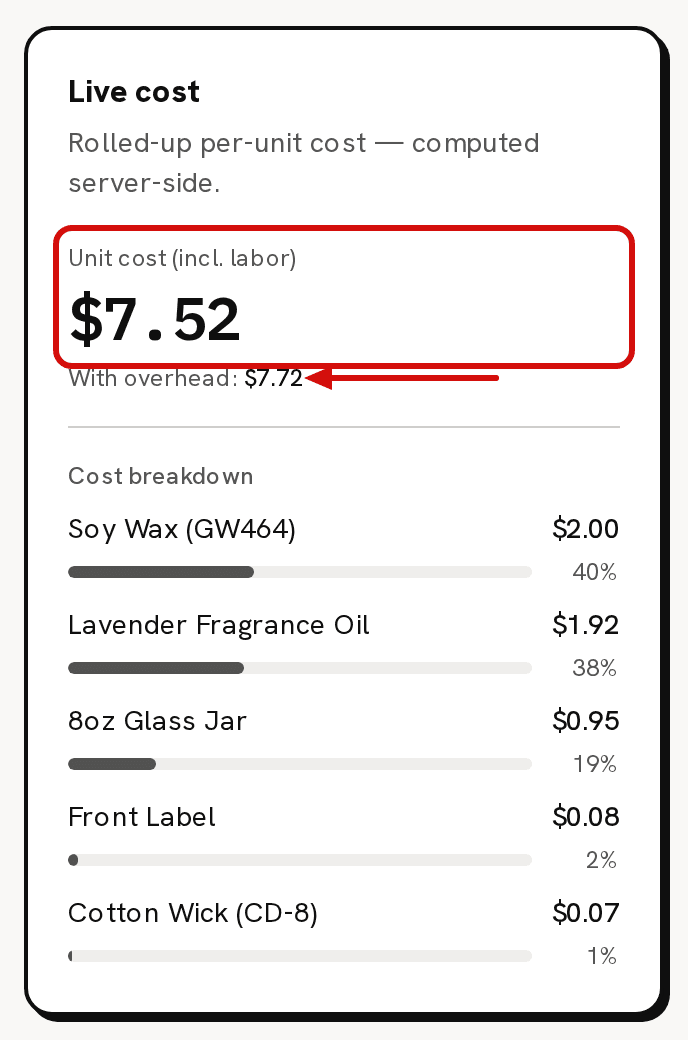
A recipe can carry a flat Overhead ($), such as a share of rent or electricity for each unit. It shows on the recipe as the With overhead: line, and in Full cost on Pricing. It's never part of a batch's unit cost, so it never reaches your stock value or the cost of a sale. The sample candle's recipe shows $7.52 as its Unit cost (incl. labor) and $7.72 With overhead:. Its batches cost $7.52 a candle.
Why isn't Total cost the unit cost × the quantity?
Total cost counts only the components, which are what left your shelves: the materials, and any product used inside the recipe at its own weighted-average cost. This batch's labor isn't stock, so it isn't in it. A product used inside the recipe carries the labor of any batches that made it (stock you added by hand carries none), so a gift set's Total cost includes the candle's labor inside the candle's cost. For three sample candles, Total cost is $15.06 while 3 × $7.52 would be $22.56. The difference, $7.50, is three candles' labor.
The same components-only figure appears in four more places: Projected total on the planner, the amount in 'Batch started', what In progress holds on Inventory while the batch is running, and Components total on the batch's page.
What if I make more or fewer than the recipe makes?
Quantity to produce counts finished units. The recipe's Yield (units per run) says how many units one run of the recipe makes. Trackost scales every component, and the labor, by the quantity ÷ the yield. A soap recipe that yields 12 bars with 30 minutes of labor, made as a batch of 24, uses every ingredient twice over and counts 60 minutes of labor. A batch of 6 uses half.
Does a batch's cost ever change?
No. When a batch starts, Trackost freezes what it used, each component's cost and the labor. It completes at those figures, however long it runs. A later purchase, a recipe edit or a new labor rate changes the next batch, never this one, and never a sale already costed from it.
How does the product's own cost change?
The finished units join the product variation's stock at the batch's unit cost, and its weighted-average cost blends them in:
new cost = (units on hand × current cost + units made × batch unit cost) ÷ (units on hand + units made)
In the sample workspace, Lavender / 8oz holds 120 candles at $2.85. After a batch of 3 at $7.52, it holds 123 at (120 × $2.85 + 3 × $7.52) ÷ 123 = $2.96.

If you had sold more of the product than you had, the batch also settles that gap, so the new cost can land above or below the batch's own. Costing troubleshooting walks through it.
A worked example: three sample candles
| Component | Used | Weighted-average cost | Cost |
|---|---|---|---|
| Soy Wax (GW464) | 600 g | $0.01 a gram | $6.00 |
| Lavender Fragrance Oil | 48 ml | $0.12 a ml | $5.76 |
| Cotton Wick (CD-8) | 3 | $0.07 each | $0.21 |
| 8oz Glass Jar | 3 | $0.95 each | $2.85 |
| Front Label | 3 | $0.08 each | $0.24 |
| Total cost (materials) | $15.06 | ||
| Labor | 3 × 10 minutes | $15.00 an hour | $7.50 |
| Unit cost | ($15.06 + $7.50) ÷ 3 = $7.52 |