Why does my recipe cost differ from my batch cost?
A recipe shows what one unit costs to make at today's prices. A batch keeps what it cost on the day it started. Overhead is on the recipe only.
The short answer
- A recipe's Unit cost (incl. labor) is what one unit costs to make today: its materials at their current weighted-average cost, waste included, plus labor, divided by the yield.
- A batch's Unit cost is the same sum, worked out when the batch started and kept from then on. Purchases, recipe edits and labor-rate changes since then move the recipe, never the batch.
- The recipe's flat overhead is only on its With overhead: line. No batch includes it.
- Usually nothing needs fixing. The batch shows what that stock cost you, and the recipe shows what the next batch would cost.
Two different moments
The recipe's figure is live. On the recipe's page, the Live cost card shows Unit cost (incl. labor): each component's quantity, with its waste %, at the component's weighted-average cost right now, plus labor (the recipe's minutes at your labor rate), all divided by the yield. The Unit cost column on Recipes shows the same figure.
A batch's figure is frozen. When you click Make it now, or Start on a scheduled batch, Trackost works out the same sum at that moment and keeps it. You see it as Unit cost on the batch's page and on its row in Production. About a batch's unit cost and total cost shows how it is built.
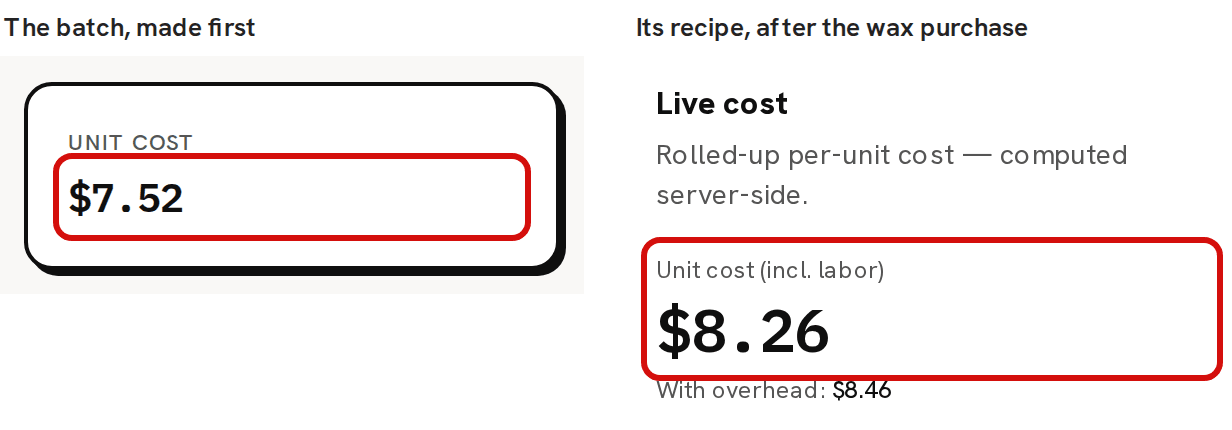
In the sample workspace, a batch of 3 Lavender Candles made today costs $7.52 a candle: $5.02 of materials and $2.50 of labor. Buying a kilogram of Soy Wax for $30.00 afterwards, at $0.03 a gram, raises the wax's weighted-average cost. The recipe's 200 g of wax now cost more, and it reads $8.26. The batch stays at $7.52.
The overhead line
A recipe can carry a flat Overhead ($) for each run, such as a share of rent or electricity. It shows only on the recipe's With overhead: line, under the headline figure, and in Full cost on Pricing. No batch includes it, so it never reaches your stock value or the COGS of a sale. The sample candle's recipe reads $7.52 and With overhead: $7.72, and its batches cost $7.52.
Compare the batch with Unit cost (incl. labor), not with the With overhead: line.
The recipe reads higher or lower than the batch
Something that feeds the recipe changed after the batch started:
- A purchase moved a material's weighted-average cost. A pricier one pushes the recipe up, and a cheaper one pulls it down. A purchase that brings a material back from below zero moves it further still, because it also settles what was used at the old cost. So does a vendor credit, or stock added on Inventory with a Cost basis. Why did my unit cost change after a purchase? explains how far a purchase moves it.
- Your labor rate changed.
- You saved a new recipe version with different quantities, waste % or labor minutes.
- A product used inside the recipe ran out of stock. See A product inside the recipe.
The Live cost card also follows changes you haven't saved yet. Type a new quantity and the figure moves at once, but batches use the saved version.
A batch you schedule keeps the recipe version that was active when you scheduled it, and takes its costs when you click Start. If you save a new version in between, that batch still uses the old one, at the prices of the day it starts.
The batch cost is $0.00 or too low
A batch costs its materials at their weighted-average cost when it starts. If a material had no purchase or opening stock recorded yet, it was used at $0.00 and added nothing to the batch's Total cost or Unit cost. With no labor rate set, or no labor minutes on the recipe, the Unit cost can be $0.00 too.
Recording the purchase afterwards doesn't re-cost that batch, or any sale already costed from it. The batch usually took the material below zero, so the purchase fills that gap first and its whole cost is charged to what's left. Wax at -2,000 g, bought as 5,000 g for $50.00, costs $0.0167 a gram afterwards where you paid $0.01. The material, the recipe and the next batches then read above the price you paid until that stock is used, which makes up for the batch that cost $0.00. Why is COGS zero on a sale? covers what that does to your sales.
A product inside the recipe
A product used as a component, like the candle inside the sample gift set, is costed at its own weighted-average cost while you have it in stock. The gift set's recipe counts each candle at $2.85, the average of the candles on hand, not at the $7.52 the candle's own recipe costs.
When that product runs out, with nothing on hand or a count below zero, the recipe costs it from its own recipe instead, and the figure can jump with no purchase at all. A product with nothing on hand and no recipe of its own can't be costed, even one you buy in with a known cost. The recipe that uses it then reads Unavailable on Recipes, and a batch of that recipe is refused with 'A component is missing cost data — check the recipe before producing.' Add stock to the component first.
A third number: the product's own unit cost
Unit cost on Products and on Inventory is the product's weighted-average cost: every batch you've completed and any stock added with a cost basis, blended over the stock you hold. In the sample workspace, 120 candles at $2.85 plus a batch of 3 at $7.52 gives 123 candles at $2.96. That is the figure your sales are costed at. About full cost vs unit cost compares it with Full cost on Pricing.
What to do
Usually nothing. The batch records what that stock cost you, and the recipe tells you what the next batch will cost at today's prices. Price from the recipe, or from Full cost on Pricing, which adds the overhead.
If a batch's cost is wrong because a material had no cost yet, record the missing purchase. The batch already made can't be re-costed. The next batches carry its missing material cost instead, so they and the recipe read high until that stock is used.