Why did my unit cost change after a purchase?
A material's unit cost is a moving weighted average, so every purchase moves it. Find the entry that moved it too far and reverse a wrong purchase.
The short answer
- A material's unit cost is the weighted average of what the stock you hold cost you. Every purchase pulls it toward that purchase's price per unit, as far as its quantity weighs against the stock you already had.
- A big move usually means the purchase went in wrong: a price typed where the total belongs, or a quantity in the wrong unit.
- WAC after in the material's Purchase history shows which purchase moved it.
- A purchase can't be edited or deleted. Reverse it with a vendor credit, then record it again. Batches and sales already recorded keep their costs.
The average moves with every purchase
You see a material's cost as Unit cost on Materials and on Inventory, and as Unit cost (WAC) on the material's own page. It is a moving weighted average. Each purchase blends in like this:
new unit cost = (on hand × current unit cost + total paid) ÷ (on hand + quantity bought)
The sample Front Label holds 1,000 at $0.08. Buying 1,000 more for $100.00, at $0.10 a label, gives (1,000 × $0.08 + $100.00) ÷ 2,000 = $0.09. A purchase at a new price always moves the cost, and a small purchase moves it less than a big one. About weighted-average cost explains the method.
Find the purchase that moved it
Open the material from Materials and scroll to Purchase history. WAC after is the unit cost right after each purchase. Read down the column. The row where it jumps or drops is the purchase that moved it.
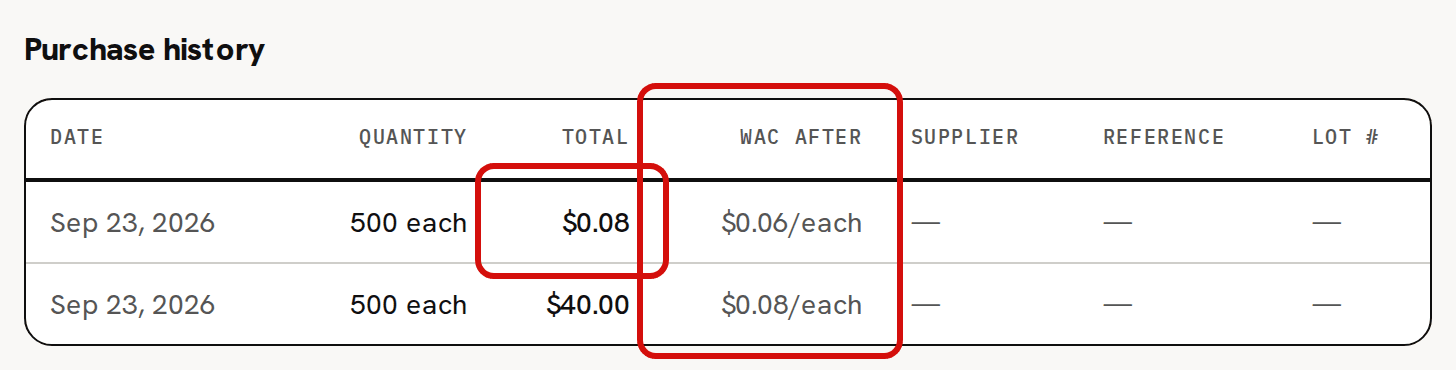
The newest purchase is at the top. Rows go by the date each purchase carries, so one you dated in the past sits lower down, but it moved the cost on the day you recorded it. Purchases received on a purchase order are listed here too.
If Unit cost (WAC) at the top of the page differs from the newest row's WAC after, either something other than a purchase moved it since, such as a vendor credit, listed under Vendor credit history, or stock added on Inventory with a Cost basis, or you recorded a purchase later with an earlier date, so it sits further down.
A price typed as the total
Total paid ($) is what you paid for the whole purchase, not the price of one unit. A unit price typed there makes the purchase look almost free, and the cost drops. A total with a digit too many does the opposite.
In the picture, 500 labels bought for $40.00 left Front Label at $0.08. The next 500 went in with $0.08, the price of one label, as the total. They came in at a fraction of a cent each, and the unit cost dropped to $0.06.
A quantity in the wrong unit
Quantity received is in the unit you buy the material in, shown in brackets after the label, such as (kg). The sample Soy Wax (GW464) is bought in kilograms and counted in grams, so 2 means 2 kg, which is 2,000 g.
- Grams typed into a kilogram box record 1,000 times the stock you bought, at a thousandth of its price per gram. The cost falls toward $0.00.
- Kilograms typed into a gram box record a thousandth of the stock at 1,000 times its price per gram. The cost rises, all the way to that price if you had none before.
Either way, that purchase added 1,000 times too much or too little to On hand, which is the quickest tell. Buy in one unit, track in another explains the two units.
Shipping and tax are in the cost
The Total paid ($) of a quick purchase is the whole cost, so shipping you include in it raises the unit cost. On a purchase order, the order's shipping and tax, less any discount, are spread over its lines by the basis chosen in Allocate by: by value, unless you chose by quantity or by weight. Each line's share comes in with it when you receive it. Both are right, because that is what the material cost you to get.
The count was below zero
If a batch took the material below zero, the purchase that brings it back fills that gap first. The units that went below zero were already used at the old cost, so the difference between the old cost and the new price is charged to what's left. The cost then lands above the purchase's own price when prices rose, or below it when they fell.
For example, say Front Label stands at -200, at $0.08 a label. Buying 1,000 for $120.00, at $0.12 a label, leaves 800 at $0.13. The 200 labels already used were costed $0.04 short, and that $8.00 is spread over the 800 left.
A purchase that doesn't bring the count above zero is refused, and the page shows an error instead of a message. Negative stock troubleshooting covers the whole case.
It reads $0.00
- No purchase or opening stock has been recorded for it, or the only one had a total of 0.00.
- It is a tool added without opening stock: a material added with Track as inventory (uncheck for tools / equipment) unchecked. Its purchases are booked as overhead and never change its unit cost. A tool entered with opening stock takes its cost from that stock.
- Its cost is under half a cent a unit. The page rounds it to $0.00, but Trackost keeps and uses the real cost.
- A vendor credit took out everything you had. With nothing on hand the cost resets to $0.00 until the next purchase.
Reverse a wrong purchase
Open the material and find the wrong purchase in Purchase history. Note its quantity and its Total.
In Record vendor credit, enter the purchase's quantity in Quantity returned, in the unit the material is counted in. That unit is in the line under the field, which ends 'on hand — returning more is rejected with no change.' Purchase history shows the unit you buy in, so convert: multiply by the material's Tracking units per purchase unit from its edit form. A wax bought as 2 kg and counted in grams is a credit of 2000.
Enter the wrong purchase's total in Credit amount ($) and click Record vendor credit. 'Vendor credit recorded' appears, and the unit cost is recalculated.
Record the purchase again with the right figures, using Record purchase.
For the labels in the picture, a credit of 500 and $0.08 takes Front Label back to 1,500 at $0.08. Recording 500 for $40.00 then leaves 2,000 at $0.08, the cost it should have had.
The credit reverses the purchase exactly only if nothing has been used from the material, or adjusted out of it, since that purchase. If you had none of the material before the wrong purchase, the credit leaves it at 0 on hand and $0.00 until you record the purchase again, which then sets the cost right.
If some of it has been used since, a credit for the full amount no longer reverses the purchase cleanly. What was used left at the averaged cost, which already included part of the wrong purchase, so the credit leaves the unit cost wrong: too high if the purchase was entered below its real price, too low if it was entered above it, and possibly below zero. A credit for more than you have left is refused with 'You can't return more than is on hand.'
Correct the stock that is left on Inventory instead:
Click Adjust on the material's row, type minus the whole quantity on hand in Quantity change, choose Correction and click Record adjustment. This takes all of it out at its current cost.
Click Adjust again, type the quantity you have as a positive number (the same number, unless the purchase went in with the wrong unit), choose Correction, enter what that stock cost you in Cost basis, and click Record adjustment. With nothing on hand before it, the cost basis sets the unit cost exactly.
Recording a purchase, a vendor credit or a cost basis needs money access.
What never moves it
Three things move a material's unit cost: a purchase, stock added with a Cost basis, and a vendor credit. These never do:
- using the material in a batch;
- taking stock out with Adjust;
- adding stock with Adjust and no cost basis, which comes in at the current unit cost.
Past batches and sales keep the costs they were given. A batch took each material at its unit cost when it started, and a sale took the product's cost when it shipped. The corrected cost applies from now on.