About weighted-average cost (WAC)
How Trackost works out a material's unit cost from every purchase: the rule, a worked example, what moves it and what doesn't, and why you never type it.
The short answer
- A material's unit cost is the weighted average of what the stock you hold cost you. Every time stock comes in with a cost, Trackost blends the new stock into the average.
- Using stock in a batch, selling it or writing it off never changes the average.
- Trackost uses a moving weighted average and nothing else. There is no FIFO or LIFO option.
- A new purchase changes the cost from then on. Past batches and fulfilled orders keep the cost they were given.
What is the rule?
When stock comes in, Trackost takes the value of what you already had, adds the value of what arrived, and divides by the new total quantity:
new unit cost = (old quantity × old unit cost + new quantity × new unit cost) ÷ (old quantity + new quantity)
Everything is per tracking unit, the unit you count the material in: per gram for a wax you buy by the kilogram. Trackost keeps the cost to a thousandth of a cent and rounds it only to show it. Screens show it to the cent, so $0.012 a gram reads $0.01/g.
When stock arrives into an empty shelf, there is nothing to blend: the new stock's cost becomes the unit cost.
A worked example
You have 100 g of beeswax that cost $0.10 a gram. You buy 200 g more for $26.00, which is $0.13 a gram.
- Value before: 100 g × $0.10 = $10.00.
- Value added: $26.00.
- New quantity: 300 g.
- New unit cost: ($10.00 + $26.00) ÷ 300 g = $0.12 a gram.
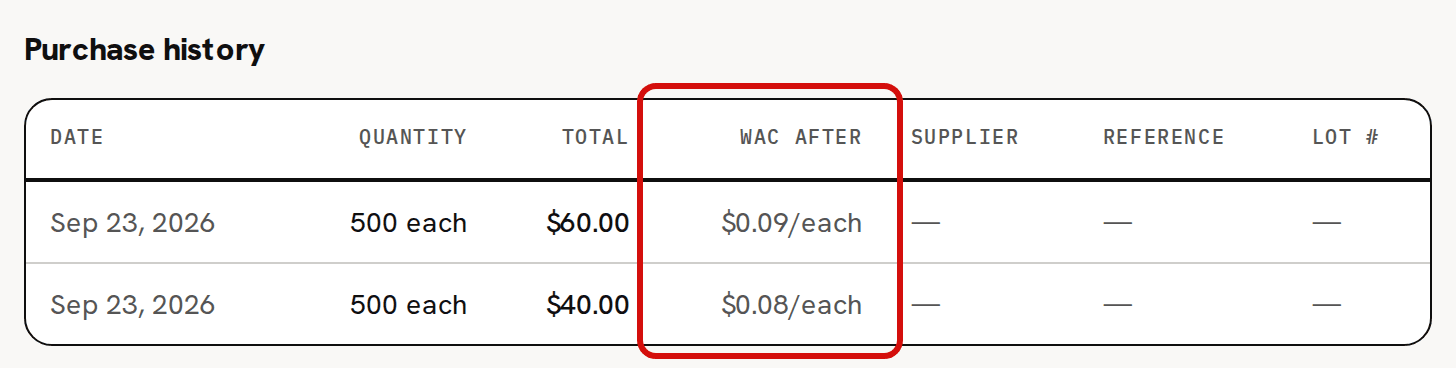
The same happens on Front Label in the sample workspace. It starts with 1,000 labels at $0.08. A purchase of 500 for $40.00 ($0.08 each) leaves the average at $0.08. A second purchase of 500 for $60.00 ($0.12 each) moves it to (1,500 × $0.08 + 500 × $0.12) ÷ 2,000 = $0.09. The WAC after column of Purchase history shows the average after each one.
What moves it?
Only stock that comes in with a cost, and stock you send back to your supplier:
- A purchase, recorded with Record purchase on the material's page.
- A purchase order line, when you receive it. It comes in at its landed amount: the line's subtotal plus its share of the order's shipping and tax, minus its share of the discount. Creating, editing, marking ordered, marking paid or canceling a purchase order moves nothing.
- Opening stock, when you add the material. It sets the first unit cost.
- A vendor credit. The returned quantity leaves, and the credit comes off the value of what's left.
- An inventory adjustment that adds stock with a cost basis. Adding stock without a cost basis adds it at the current unit cost, so the average stays the same.
Products work the same way: each completed batch adds its units at the batch's cost, and they blend into the product's average.
If a material's count is below zero when stock comes in, the new stock also settles that gap, so the new average can land above or below the new stock's own cost. A purchase that would leave the count at zero or below is refused, and the page shows an error instead of a message. Costing troubleshooting walks through it.
What doesn't move it?
- Using it in a batch. The batch takes the material out at its current unit cost.
- Selling. A sale takes the product out at its current unit cost.
- An adjustment that takes stock out: a stocktake count down, spoilage or a correction.
- A customer return with restock. The units go back into stock without changing the product's average.
- Editing the material: its name, supplier, reorder threshold or conversion.
Where do you see it?
- Unit cost on the Materials list.
- Unit cost (WAC) on the material's page.
- WAC after in the material's Purchase history: the average right after each purchase.
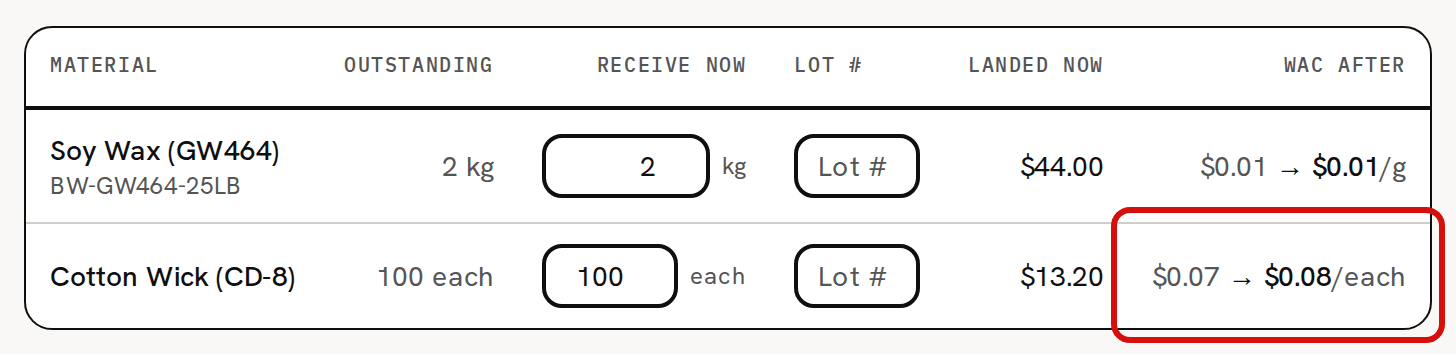
- WAC after on Receive items, before you receive a purchase order. It shows each line's cost before and after, such as $0.07 → $0.08/each, exactly as the receipt will book it.

You can't type the unit cost anywhere. The edit form shows it read-only.
Tools are the exception
A tool is a material added with Track as inventory (uncheck for tools / equipment) unchecked. Its purchases are booked as overhead, a business expense, and never change its unit cost. A tool added without opening stock stays at $0.00. One added with opening stock keeps the cost that stock was entered at. Tools are left out of your inventory's value either way.
Why doesn't history change?
A moving average only ever moves forward. When a batch starts, it takes each material at the unit cost of that moment and keeps that cost. When you fulfill an order, its cost of goods sold is fixed at the product's unit cost of that moment. A later purchase, cheaper or more expensive, changes what the next batch costs, never one already made.
The date on a purchase doesn't reorder anything either. A purchase dated last month blends into today's average like any other. Its date only decides which period it appears in on your reports.
For the full costing method in question-and-answer form, see Costing FAQ: weighted average, not FIFO.