Negative stock troubleshooting
A batch or sale that runs short goes through, and the count goes below zero. What Short, Stock went negative and Untracked production mean.
The short answer
- Trackost doesn't stop a batch because its materials are short, or a sale because the product is. The count goes below zero, and Trackost tells you.
- Nothing is costed at $0.00 because of it. A batch uses each material at its current weighted-average cost, and a sale uses the product's.
- To fix it, record what's missing: the purchase for a material, the batch for a product you make, or stock with a cost basis for one you buy in. It has to bring the count above zero.
- Fixing the count doesn't change a sale already recorded.
Why stock goes below zero
A count below zero means Trackost recorded something going out that it never saw come in: a batch used material you hadn't recorded buying, or you sold units you hadn't logged making. It is Trackost's signal to record the missing step, and the batch or sale still goes through.
You see it as a negative On hand on Inventory, on Materials and on Products. Its Line value is negative too, and it lowers the Total inventory valuation until you fix it.
A material went negative
A batch used more of a material than you had. Before you make it, the planner's Consumption preview marks that material Short, and a red box says 'Some components are short on stock. You can still make this batch now — stock will go negative and the batch is flagged — or schedule it and buy what you need before you start.' Nothing stops you:
- Make it now completes the batch and shows 'Completed with warnings', with '1 component went below zero on stock'.
- Start on a scheduled batch shows 'Stock went negative', with 'This batch consumed more than you had on hand. Log the missing purchase so your costs stay right.'
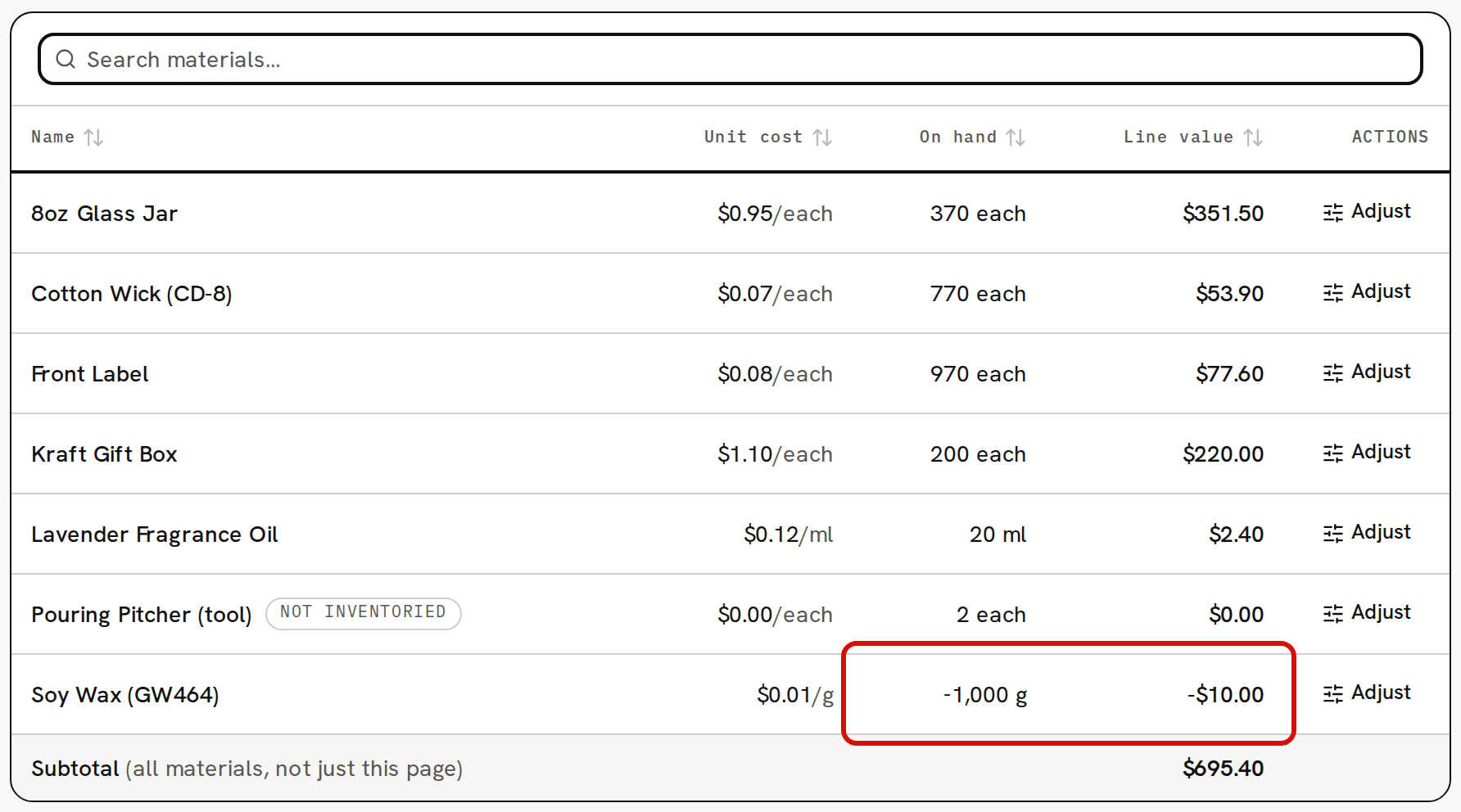
In the sample workspace, 30 Lavender Candles need 6,000 g of Soy Wax (GW464), and there are 5,000 g. The batch completes, and the wax stands at -1,000 g.
An adjustment can take a count below zero too. It shows 'Adjustment recorded — stock is now below zero', followed by a technical line.
A product went negative
You sold more of a product than you had. Fulfilling the order works anyway and shows 'Untracked production', with 'You sold more than you've produced; stock went negative. Log the missing batch.' The order's page then carries a banner, and the line a Negative stock badge.
The sample order HELP-2501 sold 35 Lavender Candle Gift Sets with 30 on hand. Its banner, in red above the lines, reads 'Untracked production — Lavender Candle Gift Set — Default went below zero on stock (you sold more than you've produced). COGS was snapshotted at the current unit cost; log the missing batch.'

The banner and the badge show whenever the product's count is below zero, on every fulfilled order of it, including ones that shipped while you still had stock. They go away once the count is back at zero or above.
What was costed anyway
Running short doesn't make anything cost $0.00.
- A batch uses each material at its weighted-average cost at the moment it starts, including the part you didn't have. The batch's cost is right as long as the material's cost is.
- A sale is costed at the product's weighted-average cost when you fulfill it. HELP-2501's 35 gift sets were costed at $4.10 each, $143.50 in all, although only 30 were on hand.
A cost is $0.00 only when nothing has given the material or product one yet, or a vendor credit took out all of a material's stock. Why is COGS zero on a sale? covers that case.
Fix a material: record the missing purchase
Record the purchase you left out, or receive the purchase order it came on. It has to bring the count above zero: a purchase that would leave it at zero or below is refused, and the page shows an error instead of a message. Record more than the shortfall, so for the sample wax, more than 1 kg.
The purchase also settles the cost. The grams that went below zero were already used at the old cost, so the difference between that cost and the new price is charged to what's left. For example, say Soy Wax stands at -1,000 g, at $0.01 a gram. Buying 2 kg for $40.00, at $0.02 a gram, leaves 1,000 g at $0.03 a gram: the 1,000 g the batch used were costed $0.01 short, and that $10.00 lands on the 1,000 g left. Record a quick purchase walks through the form.
Fix a product: log the missing batch
Log the batch you made with Make it now, or start and complete a scheduled one. It has to make more than the shortfall. A batch that would leave the count at zero or below is refused with 'A component is missing cost data — check the recipe before producing.', even when the recipe is fine. For a product you buy in, add its stock on Inventory with a Cost basis instead, again more than the shortfall.
The batch settles the cost the same way. For example, 5 gift sets sold short at $4.00 each booked $20.00 of COGS. A batch of 10 at $6.00 each then leaves 5 at ($60.00 − $20.00) ÷ 5 = $8.00 each. The 10 gift sets still add up to their $60.00, but $10.00 of their cost lands on the later sales.
Logging the batch afterwards fixes the count. The order that went below zero keeps the COGS it was given when it shipped. Make a batch now walks through the planner.
Stock doesn't match the shelf
If you aren't sure what went missing, count the shelf and correct the number: open Inventory, click Adjust on the row, choose Stocktake (count correction) and type the difference. Without a cost basis, the added units come in at the item's current unit cost. Adjust stock walks through it.
Use a count correction only when the count is wrong. If you made stock you never logged, log the batch instead, so its materials come off too and the units get what they cost.
Stock didn't change after a batch
Only a Completed batch adds finished stock.
- A Scheduled batch moves nothing until you click Start.
- An In progress batch has taken its materials but added nothing yet. Its units arrive when you click Complete.
- A Canceled batch adds nothing. One canceled after it started put its materials back.
A batch always adds its units to the variation its recipe is for, which is the product's default variation. The planner names it: 'Lavender Candle — Lavender / 8oz'. Check that variation's row on Inventory.