Fulfill an order and see its true profit
Mark an order shipped: Trackost takes the units out of stock, fixes COGS from each product's average cost, spreads the fees and shows true profit and margin.
Fulfilling an order says the goods have left. It is the step that turns an order into a sale in your books. For each line, Trackost:
- takes the units out of the product variation's stock;
- sets the line's COGS to the quantity times the variation's weighted-average cost at that moment, and keeps that figure from then on;
- gives the line its share of the order's fees, in proportion to its revenue;
- works out the line's true profit: revenue − fees − COGS.
Fulfilling needs no money access, so any team member can do it. If your trial or plan has ended, every page opens behind the plan wall, and a page left open in another tab refuses with 'Your plan has ended — subscribe to continue making changes.'
Fulfill an order
- Open Orders and click the order.
Check the date beside Fulfill & mark shipped. It is the ship date, the day the sale's revenue and COGS count in your profit reports. It starts on today's date in UTC, not in your own time zone, so in the Americas it can already show tomorrow's date in the evening. Pick an earlier day if the goods left earlier.

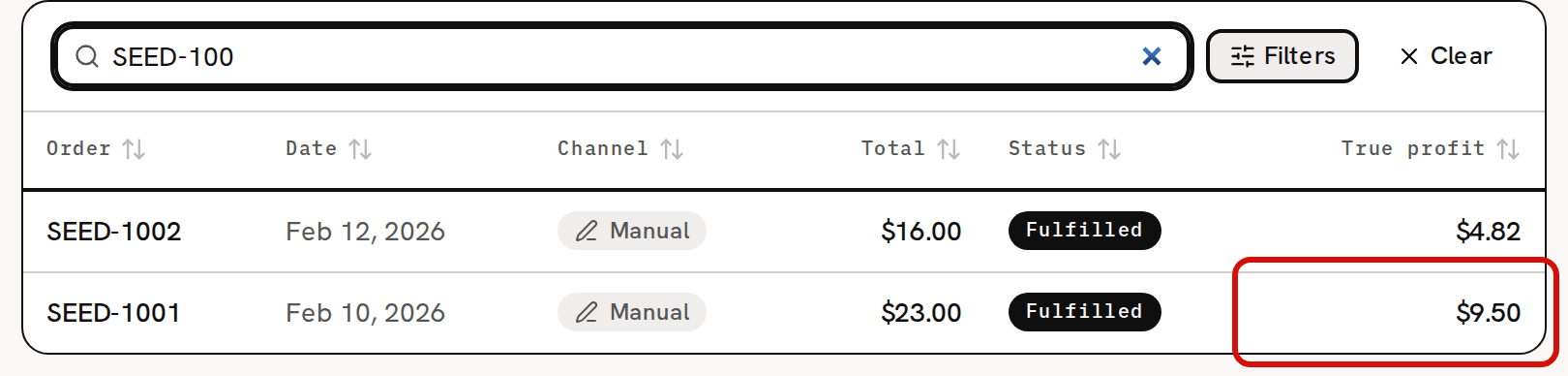
Check the ship date, then click Fulfill & mark shipped. Click Fulfill & mark shipped. The button reads Fulfilling… for a moment, then you see 'Order fulfilled' with the order's true profit, for example 'True profit $9.50 (COGS snapshotted, fees allocated).' The status becomes Fulfilled, and the COGS, True profit and Margin cards fill in.

Revenue $18.00 − fees $0.90 − COGS $7.60 = true profit $9.50.


A ship date before your inventory start date is refused with 'This transaction is dated before your inventory start date (2026-09-01). Trackost only tracks inventory from that day onward — pick a later date.', with your own start date. See About the inventory start date.
Reading the result
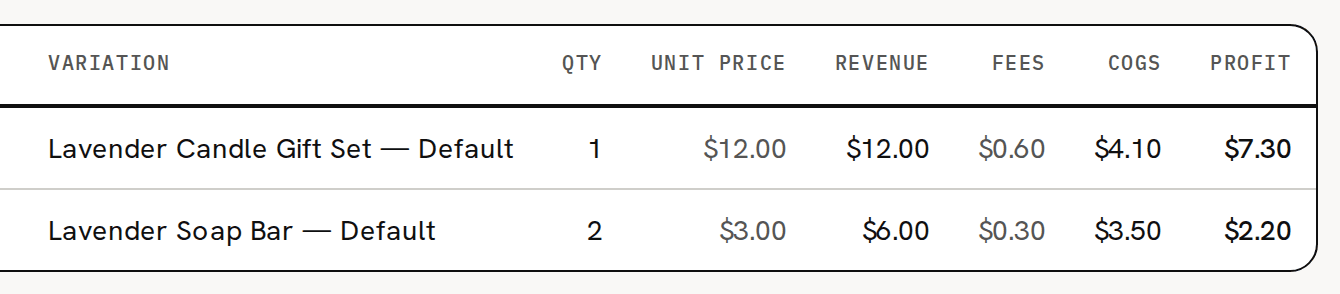
The pictures show SEED-1001 in the sample workspace: 1 Lavender Candle Gift Set at $12.00 and 2 Lavender Soap Bars at $3.00, with $0.90 of fees.
- Revenue $18.00: $12.00 + 2 × $3.00.
- Fees $0.90, spread by revenue. The gift set brings $12.00 of the $18.00, so it takes $0.60, and the soap takes $0.30.
- COGS $7.60: the gift set at its weighted-average cost of $4.10, plus 2 bars at $1.75.
- True profit $9.50: $18.00 − $0.90 − $7.60.
- Margin 52.8%: true profit divided by revenue.
In the lines table, the gift set line makes $7.30 and the soap line $2.20.
The Orders page now shows the order's true profit in its row.
Each line's COGS is fixed from now on. A later purchase or batch changes the product's weighted-average cost for the next sale, never this one. Fulfilling again never re-costs a line that already has its COGS. About COGS snapshots and true profit explains the numbers in more depth.
If a warning appears
- 'Untracked production', with 'You sold more than you've produced; stock went negative. Log the missing batch.': you fulfilled more units than you had. The order is fulfilled anyway. It shows a banner, and the line carries a Negative stock badge. The sale was costed at the product's current weighted-average cost, not at $0.00. Log the batch you made; Costing troubleshooting explains what that does to the cost.
- 'Shipped stock that is still curing': some of the units you shipped haven't finished their cure time yet. It is only a note. The order's page says how many units and until when.
If Fulfill & mark shipped can't be clicked, the order has nothing left to fulfill. Either it is fulfilled already, or its only unfulfilled lines aren't matched to a product yet. An order with an unmatched line stays Open after fulfilling until that line is matched and fulfilled too.
In-person and pickup sales
A sale handed over at a market or picked up from you is fulfilled the same way. Use the day the buyer took the goods as the ship date. Trackost has no separate pickup status.
Who sees the profit
A team member without money access can fulfill an order. Their message reads 'Order fulfilled' and 'COGS snapshotted, fees allocated.', with no profit figure, and the order's page doesn't show them the money cards.