About recipes (bills of materials)
What a recipe is in Trackost, how one run's materials, labor and yield become a cost per unit, and why every save creates a new version.
The short answer
- A recipe says what one run of a product uses, how many units the run makes and how long it takes you. Trackost turns that into what one unit costs to make today.
- The unit cost is (components + labor) ÷ yield. The recipe's flat overhead shows on a second line and never reaches a batch or the cost of a sale.
- Every save creates a new version. Batches you already made keep their cost, and there is no history screen, no restore and no delete.
- A recipe belongs to the product's Default variation.
What a recipe describes
A recipe is your bill of materials for one run: the batch you make in one go. It lists its components, each with the quantity one run uses, then how many units the run makes, how many minutes of your work it takes, and an optional flat overhead. A component is a material, or a variation of another product, such as the candle inside a gift set.
Open Recipes in the sidebar to see every variation of every product, one row each.
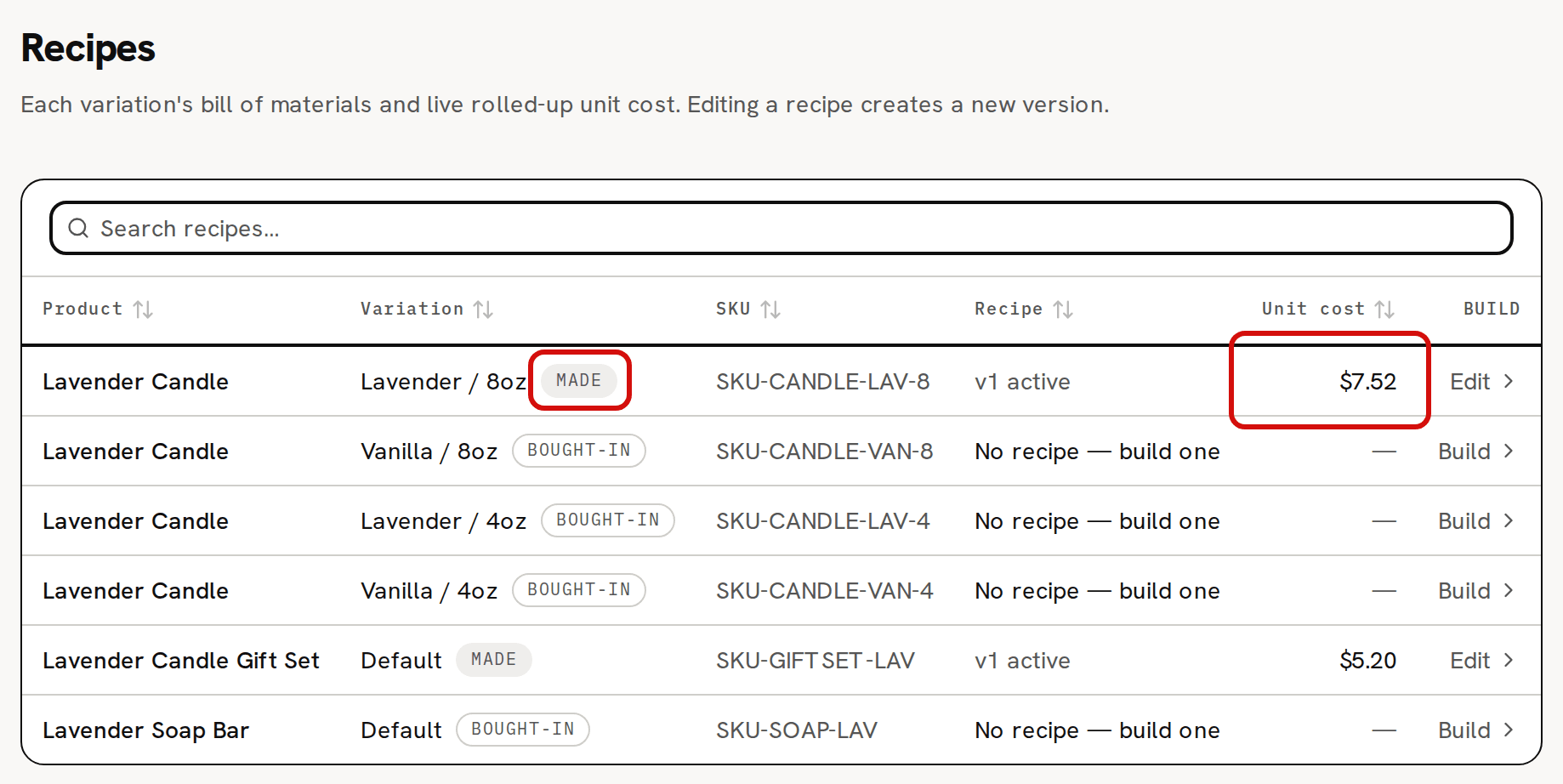
In the sample workspace two rows have a recipe, v1 active: the Lavender Candle's Lavender / 8oz and the gift set. Their Unit cost is the recipe's live cost. The others read 'No recipe — build one'.
One run, one yield
Everything in a recipe is for one run. If you pour 10 candles at a time, the quantities are what those 10 use together, the labor is the minutes for all 10, and the Yield (units per run) is 10. Trackost adds up the run and divides it by the yield.
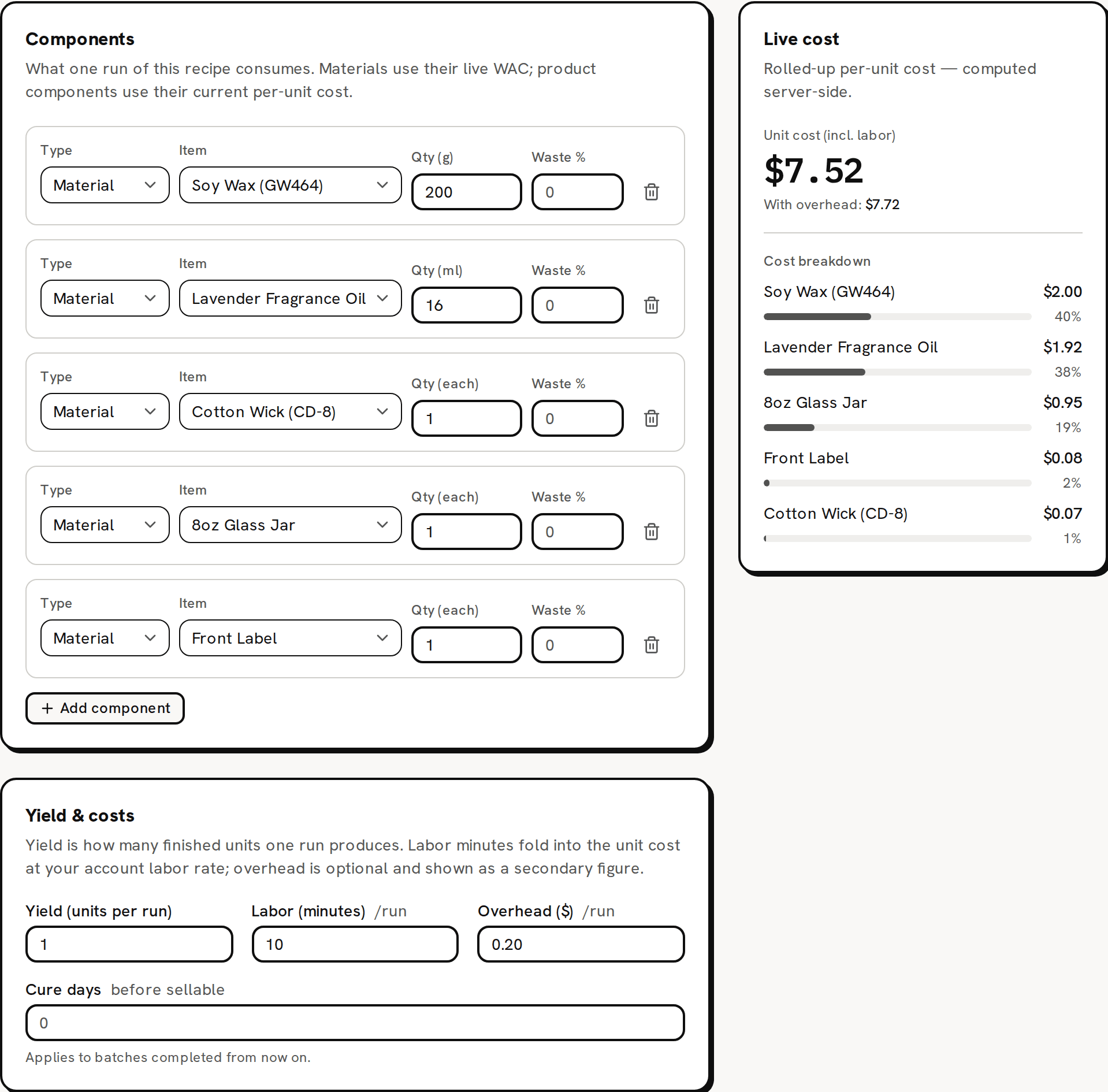
The recipe page has three parts: Components, what one run uses; Yield & costs, what it makes and how long it takes; and Live cost, what one unit costs.
What goes into the unit cost
Trackost adds up one run:
- Materials, each at its quantity times the material's weighted-average cost: what the stock you hold cost you on average. Quantities are in the unit you track the material in.
- Waste % on a row, if you set one. It raises the quantity a run uses, so it raises the cost and the stock each batch takes. 5% waste on 200 g counts as 210 g.
- Another product's variation, such as a candle in a gift set. While that variation has stock on hand, it counts at the unit cost of the stock you hold, not at its recipe cost. Only when it has none in stock does Trackost cost it from its own recipe. The sample gift set counts its candle at $2.85, the unit cost of the 120 candles in stock, while a candle made today costs $7.52.
- Labor: your hourly labor rate times the run's minutes, divided by 60. Labor is always included. A recipe with 0 minutes has none.
Then it divides by the yield: unit cost = (components, waste included, + labor) ÷ yield. That is the Unit cost (incl. labor) at the top of Live cost, and the Unit cost on Recipes.
The recipe's Overhead ($) is kept apart. When you set one, a second line, With overhead:, adds it the same way: $7.52 for the sample candle, and $7.72 with its $0.20 of overhead. Pricing uses that second figure as the product's Full cost. No batch includes the overhead, so it never becomes part of your stock's cost or of a sale's cost of goods.
Made vs bought-in
A variation with a recipe is Made. Every other variation is Bought-in, and its cost is the cost of the stock you hold. Only Made variations are offered when you plan a batch on Production. Saving a first recipe is what turns a variation into Made.
Recipes belong to a variation (the default one)
A recipe makes one variation of a product, not the whole product. The recipe page always opens the recipe of the product's Default variation, whichever row you clicked. On the sample candle, the Build links on Vanilla / 8oz, Lavender / 4oz and Vanilla / 4oz all open the recipe of Lavender / 8oz, and its header says so: 'Editing recipe v1 for Lavender / 8oz; saving creates a new version.' No other variation can have a recipe of its own. If two versions of something you make need different recipes, add each one as its own product.
Versions, not overwrites
Each time you click Save recipe version, Trackost saves a new version, v1, v2 and so on, and the new one becomes active. The badge beside the header, and the Recipe column on Recipes, show which one is active, such as v2 active.
- A batch takes its costs when you start it, so batches you already made keep the version and the cost they were made with.
- Saving a recipe moves no stock and writes nothing to your ledger. No batch, sale or stock value is re-costed.
- There is no screen that lists old versions, and no way to restore one. To go back, enter the old values and save again, as the next version.
- A recipe can't be deleted, and a Made variation can't be turned back into Bought-in.
Where recipe costs show up
- Recipes and the recipe page: the unit cost without overhead, $7.52 for the sample candle.
- With overhead: on the recipe page, and Full cost on Pricing: $7.72.
- Production: a batch takes its cost from the recipe and your materials' costs when it starts.
- Products: the Unit cost there is different. It's what the stock you hold cost you, $2.85 for the sample candle, and only completed batches and adjustments with a cost move it.
You see these costs only with money access. Without it, Recipes has no Unit cost column, and the recipe page has no Live cost card and no Overhead ($) field. Its second card is called Yield & labor. Pricing isn't in your sidebar either.
Build a recipe walks through the recipe page step by step.