About purchases
How purchases feed your stock and true cost: a quick purchase on a material versus a full purchase order, and why nothing changes until you receive.
The short answer
- There are two ways to record what you buy: a quick purchase on a material's page, or a purchase order under More › Purchases.
- A purchase order changes nothing until you receive it. Receiving adds the stock and re-averages each material's unit cost at its landed cost.
- A quick purchase is a one-line purchase that was received at once. It also appears on the Purchases list, and that entry is the same purchase, not a copy.
- Purchases are for materials only. Only team members with money access can open Purchases or see what a purchase cost.
What are the two ways to record what I buy?
- A quick purchase is the Record purchase form on a material's page. Use it for one material you already have in hand, with no shipping or tax to split. It adds the stock and re-averages the unit cost the moment you save.
- A purchase order is New purchase on the Purchases page. Use it when an order has several materials, shipping, tax or a discount, or hasn't arrived yet. It spreads the extras across its lines and moves nothing until you receive it.
Trackost stores a quick purchase as a purchase order with one line that was ordered and received on the spot. That is why it shows up on Purchases too, with the status Received and the reference you gave it, or 'Untitled purchase' if you gave none.
How does a purchase order move through its statuses?
- Draft: what Create purchase makes. You can still edit it, mark it paid or cancel it.
- Ordered: after Mark ordered. There is no confirmation and no way back to Draft, but you can still edit it until the first delivery is received.
- Partially received: some of its lines, or part of a line, have been received.
- Received: everything on it has arrived.
- Cancelled: after Cancel, which only a Draft or Ordered purchase with nothing received offers. There is no confirmation and it can't be undone.
Once anything has been received, Edit and Cancel disappear. Mark paid and Mark unpaid stay available on every purchase that isn't cancelled.
Why does nothing change until I receive?
Because an order isn't stock yet. Creating a purchase order, editing it, marking it ordered, marking it paid and canceling it move no stock and no cost. Only Receive items does, one delivery at a time, at each line's landed cost: its subtotal plus its share of the shipping and tax, less its share of the discount.
While a purchase is Ordered or Partially received, what is still to come counts as on order. The Material Reorder report subtracts it from what you need to buy, and the dashboard's Low stock list shows it beside the material. Drafts don't count. So the report's Draft POs from shortfall button creates a new set of drafts every time you click it, even when the last click already made them.
Where do purchases show up?
- On the material's page: each quick purchase and each received delivery adds a row to its Purchase history, with the quantity in the purchase unit, the total it booked and the WAC after it.
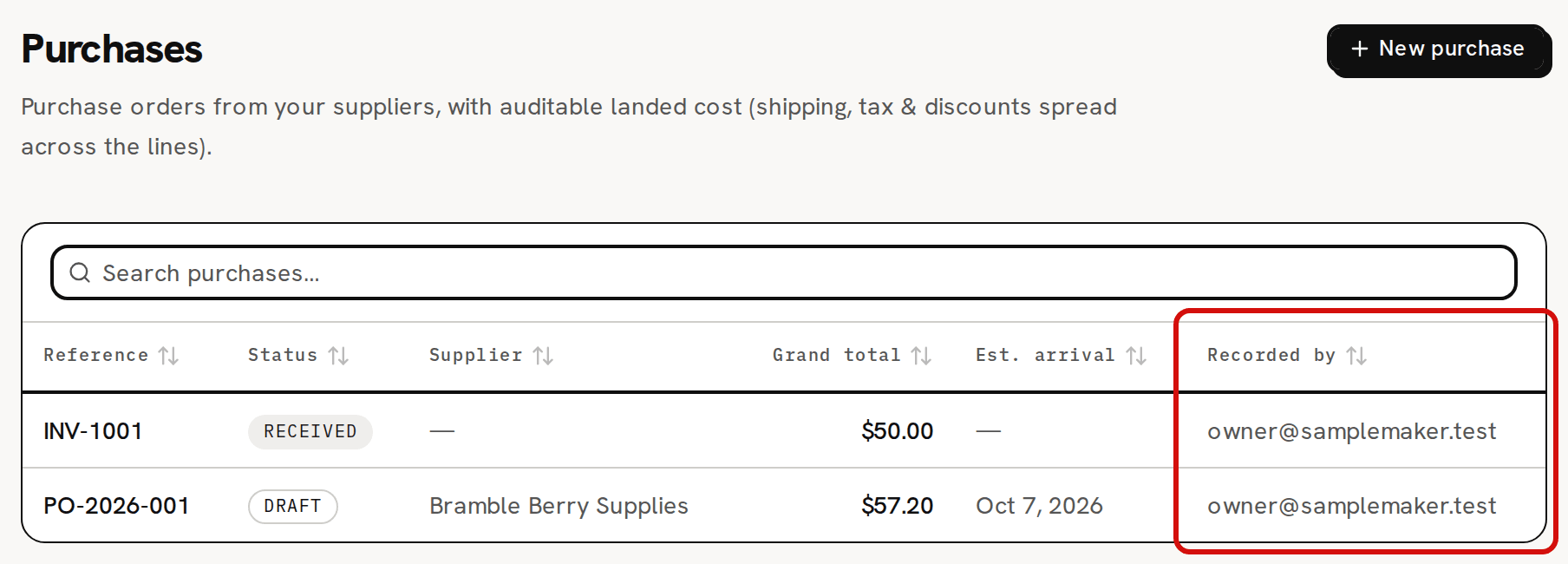
- On the Purchases list: one row per purchase, with its Reference, Status, Supplier, Grand total, Est. arrival and Recorded by. Click anywhere on a row to open the purchase.
- In Reports: Purchases by category, and the on-order figures in Material Reorder.
Recorded by shows the email address of the team member who created the purchase. If that member is later removed from the workspace, the column shows a dash instead.
Can I record other expenses here?
No. Every purchase line is a material. Trackost has no general expense ledger for rent, fees or software.
A purchase order has two optional labels, Purchase category and Spend category. They group purchases on the Purchases by category report, the purchase category also splits Purchase spend by category on Profit & Loss, and neither ever changes how a purchase is costed. The sample workspace has two purchase categories, Materials and Other / Overhead. A new workspace starts with none, and no screen adds or renames them.
A tool's purchases are the one kind that isn't stock: they are booked as overhead. That depends on the material being a tool, not on either label.
Who can see purchases?
Only team members with money access can open Purchases or record a purchase. For everyone else, Purchases is hidden from the sidebar, its pages show 'Money access required', and a material's page has no Record purchase or Record vendor credit form. They still see each material's Purchase history: its dates, quantities, suppliers, references and lot numbers, without the Total and WAC after columns.
A new workspace starts with no purchases. The first one you record, quick or ordered, starts the list.