TUTORIAL: Introduction to purchases
About 15 minutes: record a restock you already have as a quick purchase, then build a purchase order with shipping and tax, mark it ordered and receive it.
What purchases do to stock and cost
A purchase is how material comes into your workshop. When Trackost records one, two things happen to the material: its On hand goes up, and its unit cost is re-averaged with what the new stock cost you. That unit cost feeds every recipe and batch that uses the material.
Purchases need money access. A team member without it doesn't see Purchases in the sidebar, gets 'Money access required' on its pages, and has no Record purchase form on a material's page. Every purchase-order action checks again and refuses them with 'Managing purchases requires money access.', and a quick purchase with 'Recording a purchase requires money access.'
Two ways to buy
- A quick purchase, on a material's own page, for stock you already have in hand. One material, one step, and it counts at once.
- A purchase order, under More › Purchases, for an order with several lines, shipping, tax or a discount, or one that hasn't arrived yet. It moves nothing until you receive it.
In this tutorial you do one of each. The pictures use sample materials (Front Label, Soy Wax (GW464) and Cotton Wick (CD-8)) and a sample supplier, Bramble Berry Supplies. Your workspace doesn't have them, so use your own material and supplier wherever the steps name one.
Part 1: a quick purchase on a material
You bought 5 more front labels and paid $50.00. The numbers are large so the change is easy to see.
- Open Materials and click Front Label.
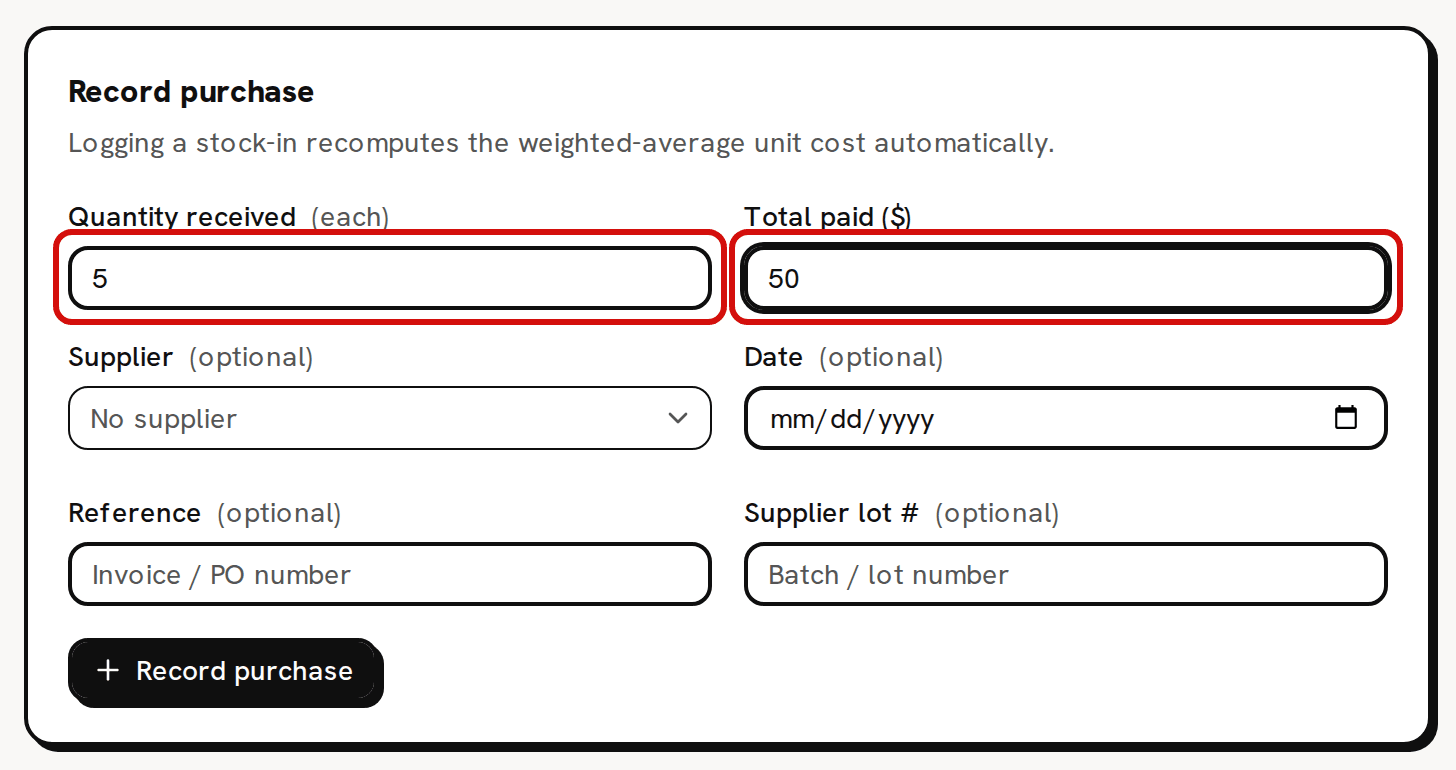
- In Record purchase, type 5 in Quantity received. The unit in brackets after it, (each), is the unit you buy in.
Type 50 in Total paid ($): the total for all 5, not the price of one.
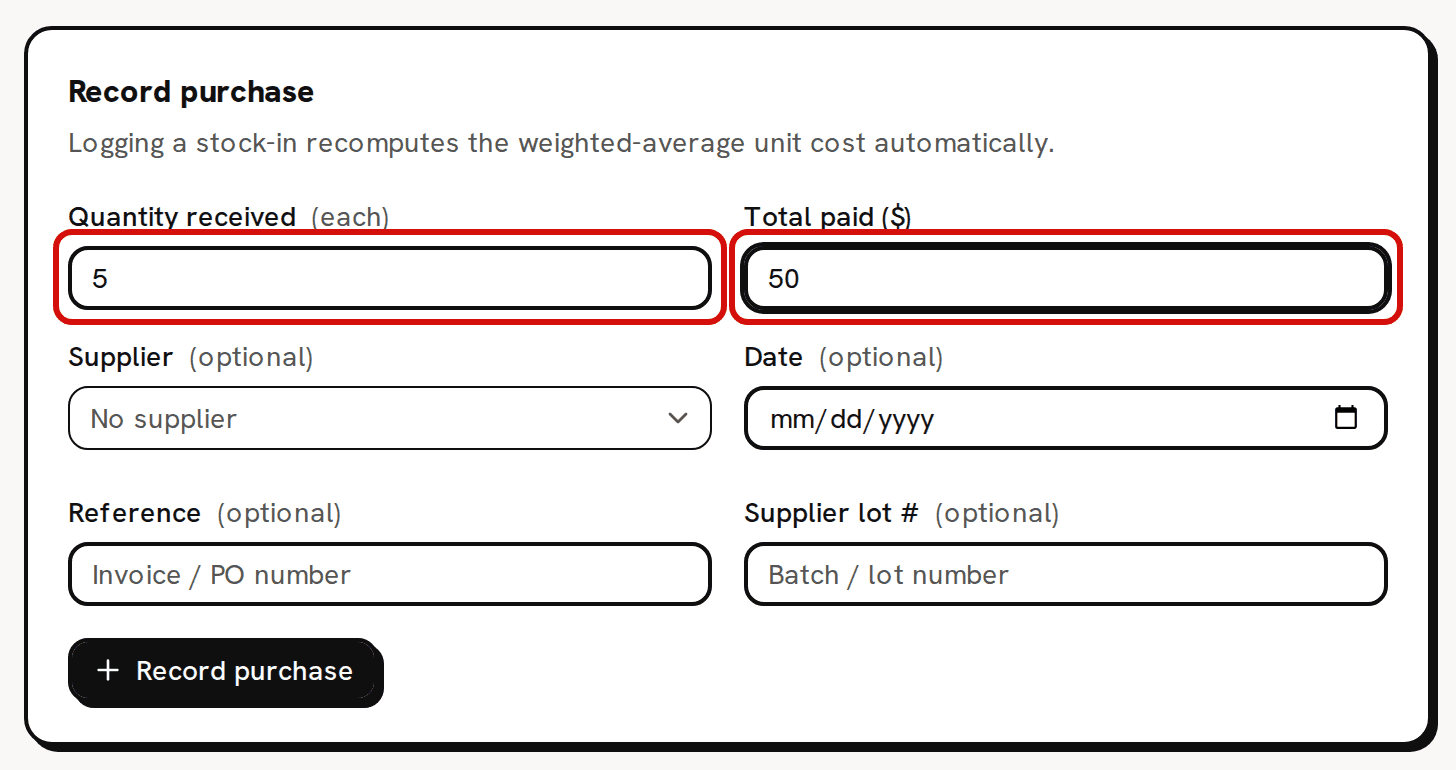
A quick purchase: the quantity received and the total paid. - Click Record purchase. You see 'Purchase recorded'. On hand goes from 1,000 to 1,005 each, and Unit cost (WAC) goes from $0.08 to $0.13, the new weighted average.
The purchase is also listed on Purchases, as a purchase that was received at once.
Part 2: a purchase order with shipping and tax
Now order wax and wicks from Bramble Berry Supplies: 2 kg of Soy Wax (GW464) for $40.00 and 100 Cotton Wick (CD-8) for $12.00, with $5.00 shipping, $1.20 tax and a $1.00 discount.
- In the sidebar, under More, click Purchases, then New purchase.
- Pick Bramble Berry Supplies under Supplier. Type PO-2026-001 in Reference and pick a date in Estimated arrival.
- In the first line, pick Soy Wax (GW464) under Material. Type 2 in Qty ordered: the kg beside it tells you the unit. Type 40.00 in Subtotal ($).
- Click Add line. Pick Cotton Wick (CD-8), type 100 and 12.00.
Type 5.00 in Shipping ($), 1.20 in Tax ($) and 1.00 in Discount ($). Leave Allocate by on By value (goods subtotal).
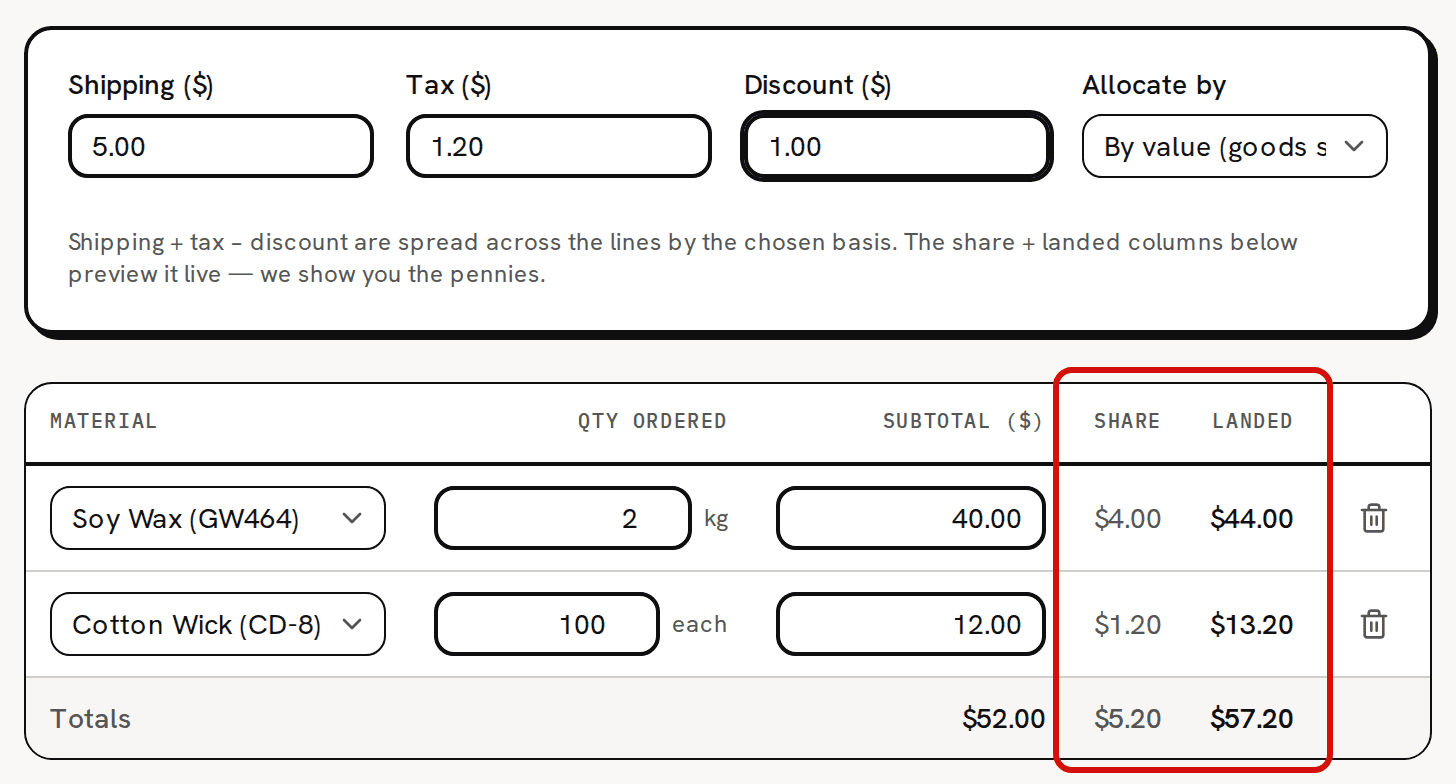
Shipping, tax and discount are spread across the lines as you type. - Click Create purchase. You see 'Purchase created' and the purchase's page, with the status Draft. Nothing has moved yet: no stock, no cost.
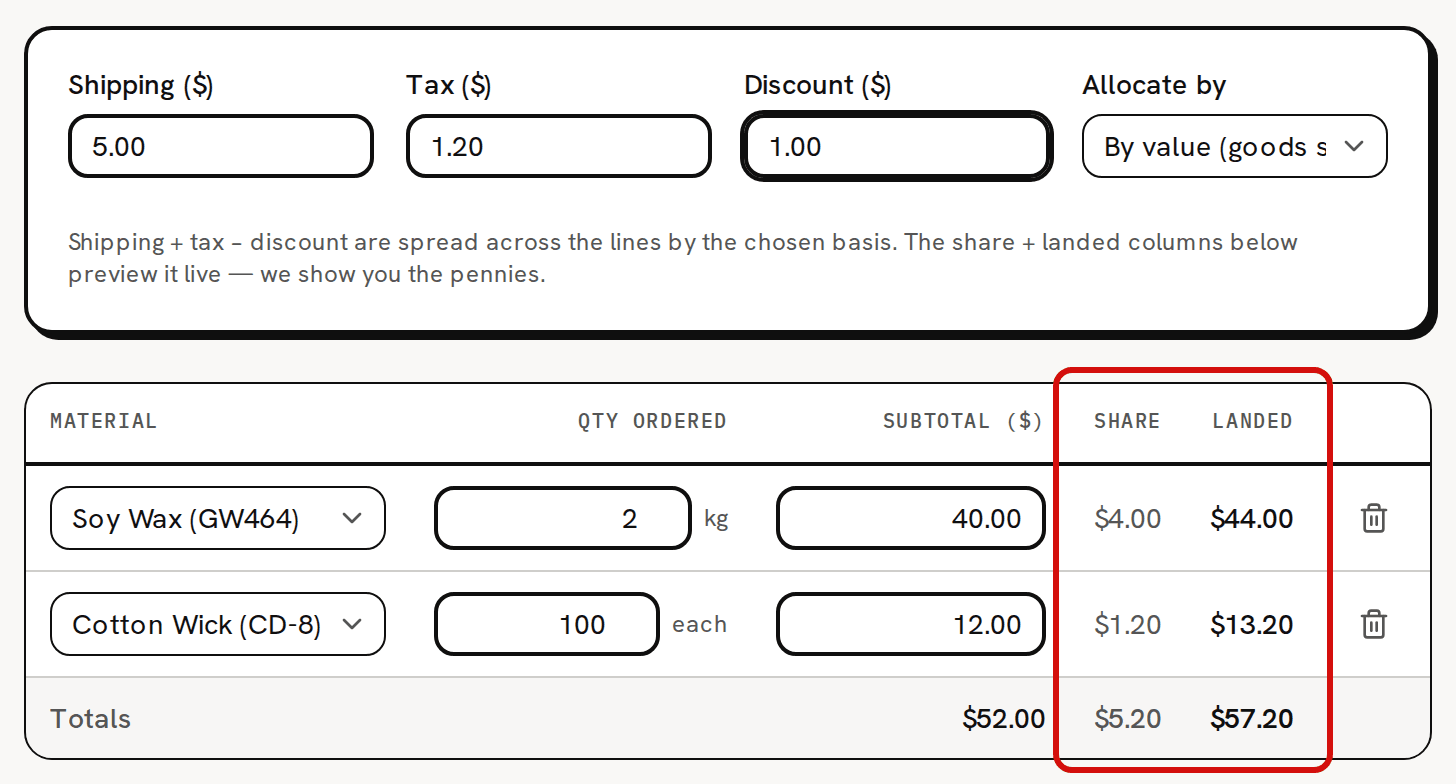
Reading the Share and Landed columns
Shipping, tax and the discount add up to $5.20 ($5.00 + $1.20 − $1.00). Trackost spreads that across the lines in proportion to their subtotals, because Allocate by is By value (goods subtotal):
- Soy Wax (GW464): $40.00 of the $52.00 of goods, so its Share is $4.00 and its Landed cost is $44.00.
- Cotton Wick (CD-8): $12.00 of $52.00, so its Share is $1.20 and its Landed cost is $13.20.
The shares always add up to the $5.20 to the cent, and the Totals row's landed figure, $57.20, is what you pay the supplier. The landed cost is what each material cost you with the extras included, and it is what reaches the unit cost.
Mark ordered, then receive
When you send the order to the supplier, click Mark ordered on the purchase's page. You see 'Marked as ordered' and the status becomes Ordered. There is no confirmation, and no way back to Draft.
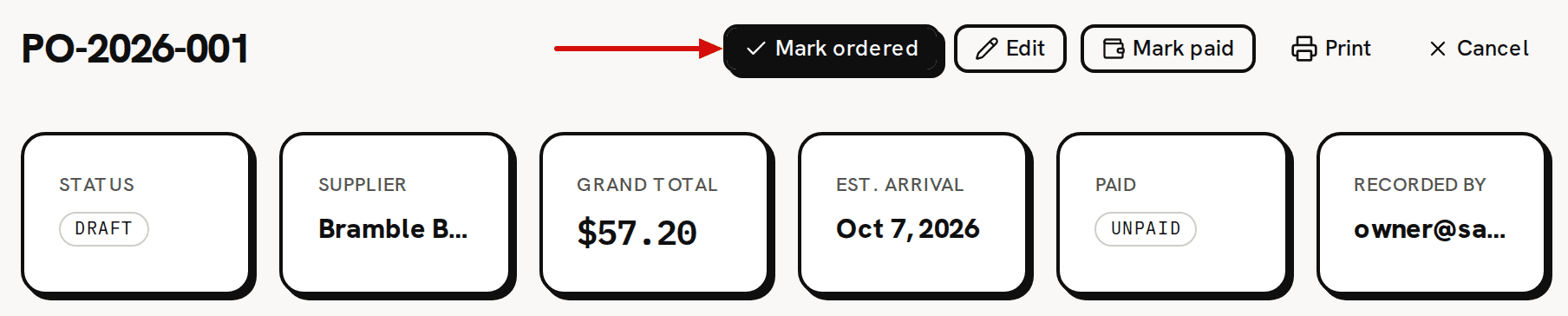
A draft purchase: Mark ordered, Edit, Mark paid, Print and Cancel. - When the box arrives, click Receive.
On Receive items, each line is already filled in with everything still to come: 2 kg of wax and 100 wicks. Landed now shows what each line will add, and WAC after shows each unit cost before and after.
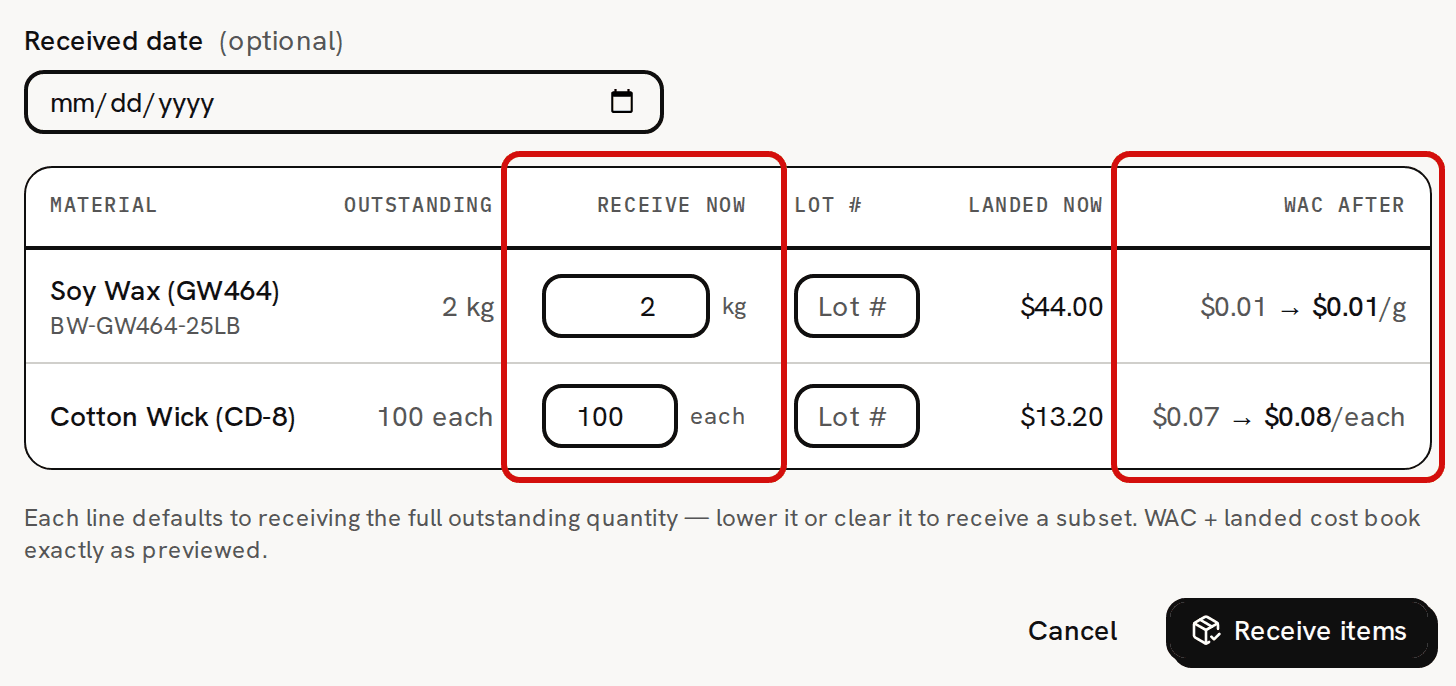
Every open line is filled in; WAC after previews what will book. - Click Receive items. You see 'Items received', and the status becomes Received.
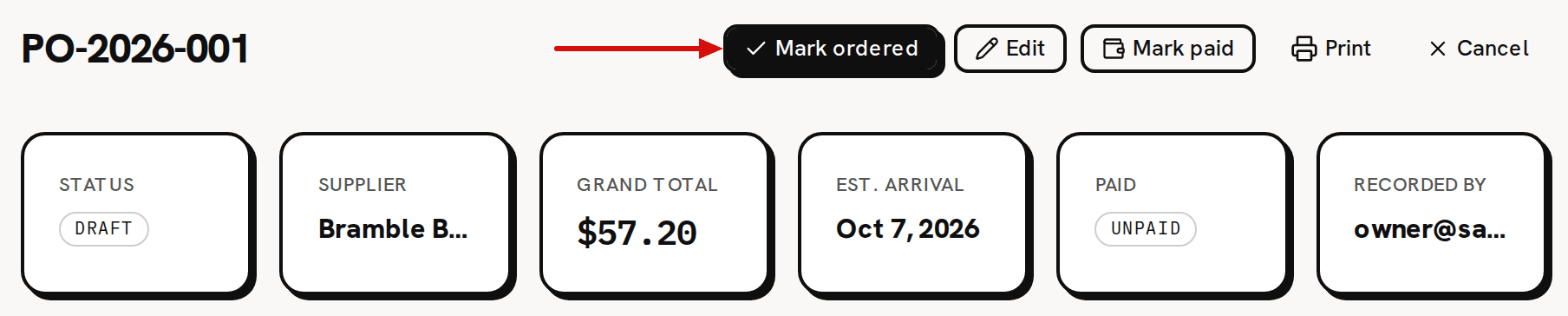
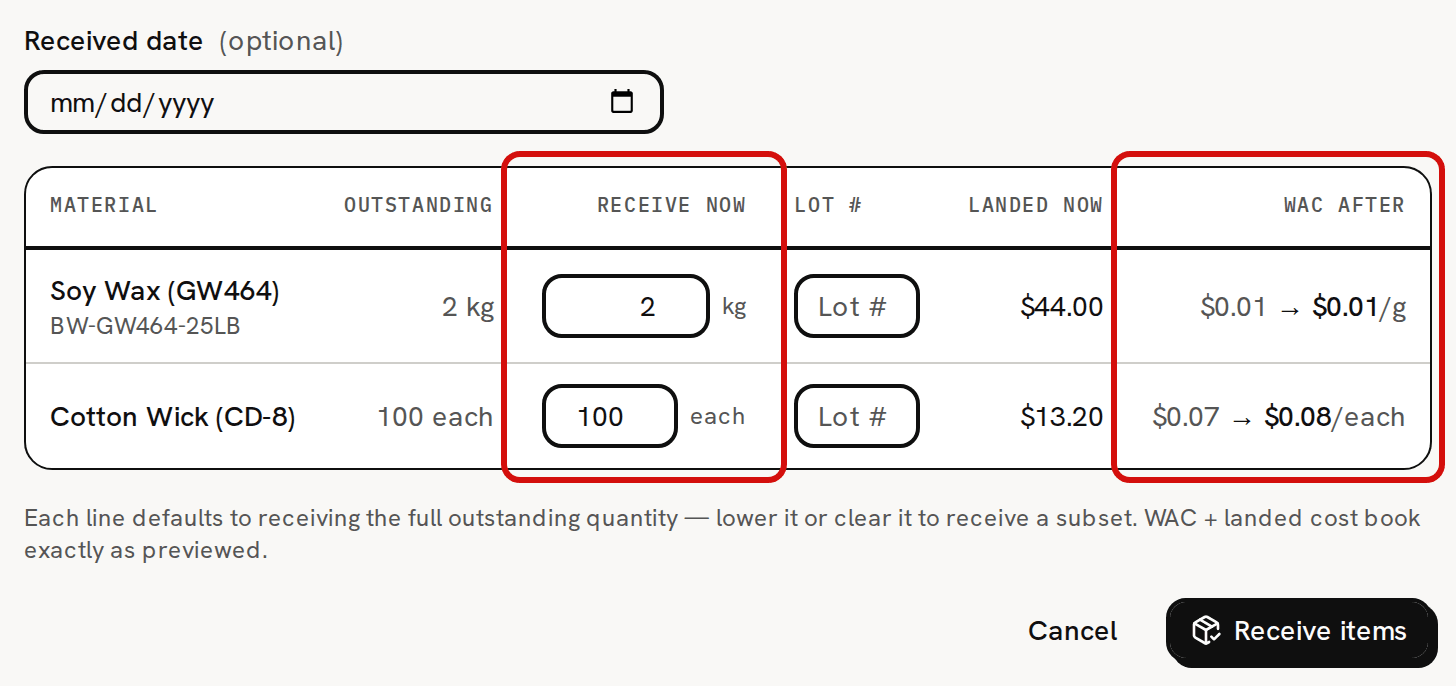
Receiving is the only step that moves stock and cost. Creating the order, editing it, marking it ordered, marking it paid and canceling it move nothing.
A quick purchase or a receipt is dated today unless you pick another date. It can't be dated before your inventory start date. Trackost refuses it with 'This transaction is dated before your inventory start date (2026-09-01). Trackost only tracks inventory from that day onward — pick a later date.', showing your own start date.
What changed on each material
Open Materials and click Soy Wax (GW464). On hand has gone from 5,000 g to 7,000 g. Purchase history has a new row: 2 kg, Total $44.00, the landed amount, from Bramble Berry Supplies with the reference PO-2026-001.

The received line lands in the material’s history at its landed amount. - Open Cotton Wick (CD-8). On hand has gone from 800 to 900 each, and Unit cost (WAC) from $0.07 to $0.08.

The wax's unit cost still reads $0.01/g. It did move, from $0.010 to about $0.0134 a gram, but screens round unit costs to the cent.
Quantities on a purchase are in the purchase unit (2 kg), while On hand and the unit cost are in the tracking unit (grams). Buy in one unit, track in another lists which screen uses which.
If your trial or plan has ended, Trackost refuses every save with 'Your plan has ended — subscribe to continue making changes.'
What you have now
- A quick purchase on Front Label, which counted at once.
- A received purchase order, PO-2026-001, whose shipping, tax and discount went into the cost of the wax and the wicks.
- Two materials with more stock and re-averaged unit costs.
For the details, see Record a quick purchase on a material, Create a purchase order and Receive items into stock.